Enterprise Initiatives

This blog focuses on Enterprise IT topics such as Enterprise Architecture, Portfolio Management, Change Management, Business Process Management, and recaps various technology events and news.


There is no shortage of advice on the web of the do's and don'ts for tackling SOA. One topic that I don't see discussed much is the assessment of a company's IT skills as it pertains to the ability of a company to comprehend and actually deliver on the promise of SOA. This is part one of a series that addresses the many skillsets required to deliver a Service-Oriented Architecture.

I have mentioned in the past that companies that have not invested in enterprise architecture may struggle as they shift from software development to software engineering.

Here are the wikipedia definitions of these two terms:

Software development is the translation of a user need or marketing goal into a software product

Software engineering is the application of a systematic, disciplined, quantifiable approach to the development, operation, and maintenance of software.

There is a major difference between the two. Software development is the creation of software regardless of the means used to accomplish the task. Software engineering involves using a defined set of processes, procedures, and standards with the goal of improving the reliability and maintainability of the systems being built. So for companies that don't take a software engineering approach to software development, they may have huge challenges doing SOA with their existing staff. Throughout this series I will make reference to the shift from development to engineering as a key aspect of each skills assessment as I discuss SOA evangelists, architects, developers, testers, and many others.

When kicking off an SOA initiative, companies should perform a readiness assessment to identify areas of concern and create action plans to address them. For this series of posts, I will focus on internal skills in the IT organization.

First and foremost, a SOA Evangelist is critical to the success of any SOA initiative. This person must understand SOA inside and out from the perspective of both IT and the business. From the business standpoint the evangelist must understand the business drivers, the financial impacts and ROI, and can speak to the business in their language. From the technology standpoint, the envangelist must understand all aspects of the archtiecture in order to communicate effectively to developers, testers, security professionals, architects, network and infrastructure personnel, project managers, business and process analysts, and management. The evangelist should promote SOA and importance of governance and should help establish the Center of Excellence (CoE) needed to provide oversight and enforce the principles of software engineering. I have seen and read about several instances where SOA initiatives that were successful quickly turned to chaos upon the departure of the company's evangelist. In one case, the company quickly lost sight of the business drivers and began to debate on technical issues like whether the services should be done in .Net or Java. These are the unfortunate consequences that happen when SOA is left to those who don't have a full understanding of the technical and business benefits of SOA and focus on software development as opposed to software engineering.

Characteristics of an SOA Evangelist
An SOA Evangelist should have strong leadership skills, strong technical or even architecture level skills, should be business savvy, have a grasp on core financial concepts, and be comfortable presenting to people at all levels. On the same day, the evangelist can be expected to discuss key issues with C-level executives and then roll up the sleeves and explain the advantages of the distributed nature of SOA to the technicians. This person can expect to be confronted with various pockets of resistance which is natural for initiatives that introduce new concepts to an organization. Organization change management skills are a necessity for a person in this position. One of the key challenges for a person in this position is to get the staff engaged and give them a sense of ownership. Without this, the staff may look at the the initiative as a pet project of the evangelist instead of what it is, a key initiative for the business. The evangelist will have to lean on the exectuive sponsor and top level management to help with this.

Life without a SOA Evangelist
I feel that without an SOA Evangelist, companies will struggle for a number of reasons. First, having an expert on SOA who spreads the knowledge throughout the organization is much more efficient than having various individuals coming up with their own definitions and perceptions of SOA. An evangelist can brand and market the vision of SOA for the entire company so everyone is talking the same language. Second, the evangelist also bridges the gap between the business and IT and ensures that the technologies being implemented are focused on the business needs and not the needs of IT first. In addition, the evangelist can translate IT speak to business speak and spare the business of technical details that tend to dominate conversations when technicians discuss SOA. But most importantly, there is usually many different silos within both the business and IT that must be brought together to work as one. The evangelist is likely the person who knows enough about each silo (at a high level) to help bring all of these parties together. Without cohesion between the silos the SOA initiative can spiral into chaos.

In my next post I will discuss SOA and the architects.


Below is the presentation that I am giving tomorrow at the SOA Consortium. Today we discussed numerous case studies. In each case, there were major changes within the organization that had to be overcome. In some cases, the business had to standardize their business processes which required them to change the way they think and work. In other cases, developers had to shift their mindset from the way they have always built things to a more service-oriented approach. In several of the government case studies, large organizations with completely different cultures and processes had to work with other government agencies that they have never worked with before. I could go on and on but the common theme in all of these case studies was that change was one of the most challenging parts of the SOA implementations, not the technology. In fact, one initiative took a year and a half just to get 18 different government agencies to agree on a standards, requirements, and data definitions. Talk about change!

Anyways, here is my presentation about change and how to plan and manage it.


SOA & Change
View SlideShare presentation or Upload your own. (tags: soa change)


I frequently discuss SOA with potential clients, fellow architects, and business partners. Each audience requires a discussion that is tailored to the appropriate level of technical and business expertise. Today I had to present to a CEO and a few of his top staffers about what it takes to launch into a SOA initiative. So I put together a presentation similar to the one below and felt like sharing it with all of you.

Before you look at it let me put the discussion into context. The target audience is hi level management, business and IT, who are already bought into SOA and are trying to understand what is involved before they launch into a full blown SOA initiative. This is not a presentation for architects, rather it is to inform C-Level stakeholders what is required from a business, technology, and culture standpoint.

I also had to sell to them that I know what I am talking about, hence the first few slides about my background. One last note: Some of the slides are mostly visual and only get the point across when backed up with talking points.

I hope this adds value to some of you. Enjoy!

Are You Ready For Soa
View SlideShare presentation or Upload your own. (tags: soa governance)


I just had a very frustrating experience with the support folks at Dell. Last year I bought three Dell Inspiron 1721 laptops for my wife and two kids. The performance of these laptops were so poor that I switched two of them to Linux. Today I received a notification that my warranty was expiring in five days. It reminded me how badly I was ripped off having to spend about $250 of the $1000 laptop price on Vista which is not capable of performing at acceptable levels on the hardware that Dell sold me. So I decided to call Dell support to see if I could downgrade to XP or get some discounted pricing on memory (a long shot). After over two hours of being passed around like a hot potato from support person to support person, getting disconnected twice, and in the end getting told that they could not help me, I felt obligated to write Michael Dell a letter. I do not expect him to ever read it or anybody at Dell to act on it, but I do feel obligated to rant about it publicly. This is how loyal customers get treated! So here is my email I sent to Michael Dell titled "An angry customer":


Michael,

I have been a loyal Dell customer for over 10 years and have purchased at least 10 PCs and laptops in that time. I have also recommended Dell to my friends and family for years. Today, that loyalty is gone. Last September, I purchased 3 Inspiron 1721 laptops for my wife and two kids. They all had older model Dell's that were hand me downs each time I treated myself to the newest model. I ordered them online and purchased the low end priced model which fit my budget (about $1K each). I wanted to get Ubuntu but the only OS available for these models was Vista. I didn't think that Vista would run well without a ton of memory, but I figured that if Dell only offers Vista on these laptops, then Vista must have acceptable performance on them.

Within a month, due to delays in parts and shipping, I finally received all three laptops. The performance of these laptops are totally unacceptable. My wife and daughter refused to use these machines and went back to their old Dell's running XP. I became so frustrated with these machines that I wiped them out and put Ubuntu on two of them. They run fine now but I can't run some of the software that my kids use. I eventually bought my wife a Mac and she is a happy camper. My son still has Vista because he plays a game that requires a Microsoft OS. Using his computer is such a painful and time consuming experience.

Yesterday I received a letter from Dell asking me to renew my warranty which is set to expire in 5 days. I thought to myself, "Since I am still under warranty, Dell should still be held accountable for selling me laptops that do not have acceptable performance for the base configuration that I selected online". In other words, Dell is selling laptops to consumers that have unacceptable performance and provide no alternatives for better performing operating systems. I did not have a choice to choose anything other then Vista. So I called support hoping that the company would assist a long time loyal customer by allowing me to exchange my Vista license for XP licenses (downgrade to XP) or give me some discount pricing on memory. Had I known that Dell did not have a $1K laptop that had acceptable performance, I would not have bought any, not to mention three of them.

To make a long story short. I spent over 2 hours on the phone getting transferred from one person to the next. Each time I had to reiterate all of the order information, personal information, and my issue. Each time I asked for a manager and was not granted my wish. At two different times I had a support person agree to send me XP licenses at no cost. Both times they transferred me to technical support (don't ask me why) were I was put on hold and eventually received a busy signal. Then I had to call in again and start the entire process over again. Eventually I was able to talk to manager. Once again I had to go through the entire information gathering exercise and the explain my case. Don't you guys use computers? If I have purchased computers from Dell on your web site for 10 years, don't you already have all of my info including my hardware specs? I am able to see all of this info from my side. Oh, you don't do software!

Anyways, this guy (employee # 110337 with a fake US name called "Dave") basically told me that he can't help me and I have to buy the XP licenses or buy more memory. He says that I should have dealt with this issue when I first bought the laptops, not now. My point is that it is still under warranty so it shouldn't matter. Regardless, it is beyond belief to me that your company would sell computers that do not have enough memory to run Vista at an acceptable performance level and then turn your back on a loyal customer who is stuck with three laptops that nobody wants to use. Nobody who buys a brand new laptop should have to wait over 10 minutes to boot it up. And nobody should have to spend over two hours going through your inefficient customer service processes. I would really appreciate it if your company would allow me to downgrade to XP at no cost. But I have such low expectations from Dell now that I am moving on. I am now a new avid Mac fan!

Cheers,

Mike Kavis

P.S. This sounds like a great topic to blog about!


To successfully lead an IT organization, one must excel in three key areas: Technology, Business, and People.


When attempting to implement enterprise initiatives, those leaders who do not excel in people skills will have some serious challenges. For whatever reason, many IT leaders neglect the "people side of change" (listen to my podcast with ZDNet's Michael Krigsman) and do not address a critical need - Organizational Change Management.


I am a huge fan of Harvard's leadership guru, John Kotter. Kotter has a proven 8-step methodology for leading through change. Here are the steps:


1. Create a Sense of Urgency
2. Pull Together the Guiding Team
3. Develop the Change Vision and Strategy
4. Communicate for Understanding and Buy In
5. Empower Others to Act
6. Produce Short-Term Wins
7. Don’t Let Up
8. Create a New Culture

For more on this topic I recommend his books "Leading Change" , "Our Iceberg is Melting", and also "Change Management: the People Side of Change" by Jeffrey Hiatt and Timothy Creasey.


And remember, now matter how good you do with the technology and business side of the equation, if people resist change your project will more then likely fail.


Startups and Non-profits

Startups and non-profit organizations typically are constrained by limited capital budgets. Startups need to quickly launch their products and services at low costs. Cloud computing allows startups to rapidly deploy into a “leased” infrastructure supplied by a cloud computing vendor without having to procure a ton of hardware, hire system administrators, and build out a data center. In addition, the cloud computing option allows startups to pay as they grow as opposed to having to pay for maximum capacity out of the gates. Startups also have the luxury of starting with a blank sheet of paper as opposed to having to migrate their legacy applications to the cloud.

Many non-profits, like the United Way and Goodwill, are funded by donations. It is in everyone’s best interest that the majority of these donations are used to benefit the people who need help from these organizations. Building large data centers and hiring people to look over them is not a great way to achieve this goal. Instead, non-profits can now move their data centers to the clouds and spend more of its donated funds on worthy causes instead of infrastructure.

Small and Midsize Companies

Small and midsize companies have to stretch modest IT budgets to meet the demands of the business while providing 24x7x365 capable systems. Some of these companies cannot afford to support multiple data centers to protect against disasters and to provide business continuity. Others have a robust main datacenter and a scaled down backup datacenter that would allow the company to limp along for a short period of time if an unfortunate event was to occur. But the bigger challenge is to focus enough resources on revenue generation. The more resources these companies have keeping the lights on, the less demand from the business they can support. These companies often have to make some compromises in technology upgrades, architectural decisions, and infrastructure purchases to allow them to meet the needs of the business. I have worked in a few midsize companies over the years and witnessed this first hand. Every year we were asked to do more with less money and we often had to provide “good enough” solutions because we could not afford to build the level of robustness into the infrastructure and applications that we would have liked.

With cloud computing, small and midsize companies immediately get the benefits of world class infrastructure without having to procure, implement, and administer it. This frees up resources to focus on innovation and business demands. In addition, these companies can leverage multiple datacenters located in different geographical locations to meet their disaster recovery and business continuity needs. As the demand for computing resources increase, staff can add additional servers and disk on the fly by using tools provider by the cloud computing vendor without having to purchase any hardware. They simply just tap into some more computing resources into the cloud and pay for what they use.

Large Companies

Large companies with billion dollar IT budgets do not have a lot of the issues that the startups, non profits, small and midsize companies have. Many of these companies are watching from the sidelines as cloud computing matures, but still think it is too risky to jump in. The large companies that do adopt cloud computing will be gaining competitive advantages over their competition. Here are some of the reasons why.

Going green – Many billion dollar companies are under intense pressure to be more environment friendly. Replacing thousands of servers and other equipment is an extremely expensive and time consuming undertaking. Large companies can start by migrating their non-mission critical applications to the cloud. This allows them to go green quicker, cheaper, and get a chance to “kick the tires” on cloud computing at low risk.

Reduce costs – Energy costs for running hardware and cooling can be greatly reduced by moving applications to the cloud. In addition to reducing the amount of hardware to buy, this could prevent or at least prolong plans to acquire additional floor space, buy additional generators, or install more cooling systems.

Agility – Prototyping is another opportunity for using cloud computing. The business wants things faster from IT. IT can now quickly create a prototype by leveraging virtual infrastructure in the cloud and experiment with various configurations without having to go through long procurement cycles. Cloud computing can also be used to set up and tear down multiple test areas with ease and without having to free up or buy and configure hardware.

Security/Privacy - Large companies’ biggest fear is security and privacy. That is why some cloud computing vendors offer private clouds for their customers. Companies can enjoy all of the benefits of cloud computing within their own private VLAN and configurable firewalls to protect their data and privacy.

Conclusion

Regardless of the size of a company and its IT budget, cloud computing provides many benefits that just cannot be ignored any longer. For startups, non-profits, and small and midsize companies, cloud computing is a no brainer. Large corporations are being cautious right now. It will only take a few key success stories from a competitor who drastically reduces costs and improves its speed to market to get more large companies on board. In the mean time, large companies should look at piloting a non mission critical application in the cloud and continue to monitor the vendors as cloud computing continues to mature.

I just read a post on ZDNet where Lawson's CEO Harry Debes claims that SaaS is a failure and that it will die in two years. He also comments that people (meaning me and you) "are stupid" and "make the same mistakes over and over". Another great comment is that he complains how SaaS does not allow vendors to lock in its customers:

Getting signed up as a SaaS customer is fast, but getting out is just as fast. Whereas traditional software is like cocaine--you're hooked. It's too difficult and expensive to switch providers once you've invested in one.

Wow! How customer focused is this guy? I guess this explains why the previous version of Lawson required users to have a Unix login and a telnet session and why the product was still based on Cobol. I worked at a place that used Lawson and I was stunned by how far behind the product was from an architectural standpoint. Now I understand why.

The criticism that this guy makes towards the technology is that same old resistance to change that stalls innovation. We see it with SOA, Cloud Computing, and other initiatives that are innovative and require people to change their ways. There are leaders, followers, and stragglers. This guy is definitely a straggler and may severely hurt his company and his shareholders with his closed minded approach to technology, especially if he is wrong!

In closing, my favorite comment in response to the article is by CEO John Grabski of ClearMomentum....
I hope there are more CEOs out there with the same view. Taking their customers is like shooting fish in a barrel.
As a great leader said recently, "Enough!"

Introduction

Over the past two decades, most companies have embraced the World Wide Web as a standard platform for delivering applications to consumers, partners, customers, and even internal end users. The web offers companies easier deployments, a standard browser interface that requires minimal training, and access anywhere in the world at anytime and on any device. The downside of web applications is the limitations of HTML and the ability to deliver rich content that compares to desktop applications. Enter RIA (rich internet applications) which gives web applications the richness of desktop applications with all the benefits of web. Adobe has been the leader in the space for years. Flex was first released in 2004. They have dominated the market place against various competitors, both commercial and open source. In 2007, Microsoft introduced their Silverlight product. Silverlight is the first real threat to Adobe’s Flex. The rest of this document will focus on the pros and cons of these technologies, possible outcomes, and what the impact of this RIA race will mean to vendors, companies, and consumers.


History of Flex and Silverlight

To provide a fair comparison of these two products, it is important to become familiar with the history of the Adobe Flex and Microsoft Silverlight products. Without understanding the different releases and product roadmaps, it becomes extremely challenging to perform an apples to apples comparison.


Flex version 1.0 was first released in March of 2004. Flex requires Macromedia’s Flash runtime which is a virtual machine that runs on any operating system. In 2006, Adobe released three Beta versions of Flex 2.0 before delivering the final 2.0 version in June of the same year. The new version was based on Eclipse, an open source development platform that is popular among most Java development environments. Coinciding with this release was a new release of ActionScript 3. ActionScript is the core development language of the popular Flash Player. In 2007, Adobe released three Beta versions of Flex 3.0 with the final production 3.0 release delivered on February 25, 2008. The most significant change in this release was to make the Flex SDK an open source product. Now developers were free to contribute to the SDK which was well received by the developer community. In addition to major enhancements including integration with Adobe’s Creative Suites products, Adobe also released the first version of their own runtime called Adobe Air (formerly called Apollo). The next version (4.0) is scheduled for release in 2009. We can expect a Beta release late this year. The features have not yet been announced but one can assume that they will be addressing some of the areas that Silverlight has an advantage, including better integration with .Net.


Silverlight is a web browser plug-in that marks the first Microsoft product that is truly cross platform and cross browser compatible. The first release of Silverlight was delivered in April 2007. The focus in this release was more geared towards multimedia and lacked many features that Flex 2.0 and the 3.0 Beta version had at that time. Silverlight 1.0 depends on XAML as the underlying development language. XAML is an extendable XML language that was created by Microsoft and used extensively with the Windows .Net 3.0 framework. The next version of Silverlight, version 2.0 is targeted for late summer/early fall of 2008. The first Beta version was released in March of this year. The big news for 2.0 is the integration with Visual Studio. Now developers can use development languages that they are familiar with like C# and Visual Basic. Another much needed feature is the addition of robust debugging functionality and full set of controls for developers.


It is important to understand the major feature sets of each release. There is heavy debate on which product is best. Many Adobe fans compare Flex 3.0 to Silverlight 1.0. There is no comparison. Silverlight 1.0 was focused on getting a product out in the market place while the development team focused on creating a more robust version (now named 2.0). The Microsoft supporters, however, talk about the features in 2.0 that do not exist yet. This is not a fair comparison either since Flex also has a very promising feature set in their future release. For the remainder of this document, I will focus on Flex 3.0 versus Silverlight 2.0.


Strengths and weaknesses of Flex

Adobe Flex has a huge advantage over Microsoft Silverlight in product maturity, developer community following, and production deployments. The biggest advantage, however, is that the Flash runtime is installed on well over 90% of all PCs and laptops across the world (see Figure 1).

Figure 1

The Flash runtime also works on a variety of platforms (Windows, Mac, Linux, Solaris, HP-UX, Pocket PC, OS/2, and several others). Flash is viewable in over 85% of all browsers. Since Flex runs on the Flash Player, it is truly a cross platform, cross browser product with world wide acceptance. There is also a strong developer community and the Flex products are mature since they have been through three major release cycles. Another advantage that Flex has is that many major vendors are using Flex to deliver rich content. Microstrategy leverages Flex to deliver robust, drillable result sets and even Flash based emails to end users. Google (Google Maps), Yahoo (Messenger), IBM, SAP, E-Trade, and Business Objects are just a few of the major vendors and service providers who rely on Flex to deliver rich user experiences to their customers.


Another big benefit of Flex is that the SDK is now open source. This creates several benefits. First, testing of Flex now has thousands more eyes that can find bugs and submit them back into the community. Going open source also allows the Flex community to help drive the products direction and feature sets. Making Flex open source is also a good way to combat Microsoft, who is the nemesis of most open source advocates.


One of the biggest complaints I have heard about Flex is the learning curve required for developers. Flex uses ActionScript 3 which is a proprietary language that is required for running on the Flash Player. This is yet another language that developers must learn and is not as intuitive as Java and C#. This can lead to high costs for hiring companies and must be considered when calculating the total cost of ownership.


Strengths and weaknesses of Silverlight

Microsoft is putting together a great product to compete with Flex. In my opinion, they are still a couple of years away from matching Flex in features and community strength. However, Microsoft’s marketing capabilities coupled with their ability to target developers can help Microsoft make major gains in market share in the near future. Silverlight 2.0 allows developers to code in C# and VB which greatly reduces the learning curve. This can be a major selling point to companies that are planning to invest in RIA technologies in the future. Many companies already rely heavily on Microsoft technologies and may see Silverlight as a natural extension to their existing development stack. Microsoft also has an incredible amount of cash available to them to steer this product in whatever direction they see fit. They have already partnered with Major League Baseball and the Olympics which has created a tremendous amount of positive marketing and brand recognition.


The weaknesses of Silverlight are plenty, but when put into perspective of how long they have been in the RIA space (first release in April 2007) they have made tremendous strides in this area. First of all, Microsoft is the new kid on the block and does not have the track record of stability, performance, and maturity of the well established Flex product line. The biggest challenge Microsoft faces is trying to get the Silverlight plug-in installed on at least 80% of the PCs and laptops in the market place. If you look at Figure 1 above, you will see that the top Microsoft product installed on PCs is Windows Media Player which is slightly over 80%. This product has been out for several years so it would be unrealistic to expect the Silverlight plug-in to reach critical mass any time soon.


Silverlight currently only runs on Windows and the Mac, although an open source project called Moonlight is underway to allow it to run on Linux. Back in May of this year, Roger Magoulas from O’Reilly shared this chart (Figure 2).


Figure 2

This chart shows that book sales of Flash are selling 6-7 times higher then Silverlight. In March of this year, Eric Lai of Computerworld wrote an article comparing job postings for Flash versus Silverlight on the major job boards. His study showed that Flash skills were in demand about 41 times higher than Silverlight. Both the study on books and jobs are not extremely scientific by any means, but what they do show is that Silverlight has a long way to go to become mainstream.


Another problem Microsoft is facing is consumer trust. Many consumers have heard all of Microsoft’s promises of cross platform capabilities before only to see them not deliver on their promise. Microsoft’s cash cow for years has been their operating system. Many consumers simply can’t trust any message from Microsoft which goes against their core strategy of tying customers to their platform. Security is another issue. Microsoft does not have the greatest reputation for secure software. How many corporations are willing to roll out another Microsoft product to all of their desktops? Some may argue that Flash is no more secure, but it is already on almost every machine out there.


Possible Outcomes

There are four possible outcomes that I see. The first is that Flex will continue to dominate the market place due to the maturity of their existing products, the widespread use and acceptance of Flash, and the large investments made by major software vendors in Flex technology. Microsoft will steal some market share but in the end it will be another failed attempt to conquer the web. I feel that this is the most likely scenario. Microsoft is already losing market share in the browser war and the operating system war, although they still have a tremendous lead over their competitors. Google is becoming a dominant force on the web and open source technologies are dominating the Web 2.0 world. In every aspect of computing, Microsoft is dealing with stronger competition then they have ever seen before. RIA will be even more challenging because they are not the leader in this space.


The second most likely option that I see is that Silverlight matches Flex’s market share. The big advantage that Microsoft has is the development environment and the fact that Flex currently does not integrate with .Net backends (although they are working on it). Microsoft already has a huge developer community and many of these people can easily be persuaded to adopt Silverlight as their RIA of choice. For companies that produce consumer facing content or control the end user client machines, the Silverlight plug-in issue is not that big of a deal. Many consumers are willing to download Silverlight plug-in just as well as they will download Flash, QuickTime, and others. It is the companies that deliver applications to other enterprises that will have the challenge. As a chief architect for a medium size company, one of our criteria for selecting vendor tools is that the tool is zero-footprint or requires no installation of software on client PCs. Many other IT shops will have the same constraint because of the B2B nature of their applications. If you have no control over the client’s desktop, forcing clients to push software out on their network can be a huge show stopper.


A third possible outcome is Silverlight will fail to gain any significant market share. I find this highly unlikely. Microsoft has a ton of money and smart people behind this product. Their product vision appears to be very solid on the surface and their initial product offering is impressive for the short amount of time that they have been in the RIA space. They should easily capitalize on the numerous loyal Microsoft shops that are already in place today and I expect them to strike several more big partnerships similar to the MLB deal. I think that over the next 2-3 years Silverlight will capture about 20-30% of the market share but no more.


A fourth possible outcome is that more competition will flood the market and other products will also compete heavily for market share. JavaFx and open source project Open Laszlo are already competing, but I believe this will be a two horse race between Flex and Silverlight.


What is the impact?


This fierce competition means different things to different constituents. First let’s look at the impact to the vendors. Software vendors must keep a close eye on this RIA race. Those supporting Flex today need to make a decision whether or not they want to add support for Silverlight as well. Supporting both obviously increases the cost of developing and supporting their products. Since Flash is everywhere, they need to consider how strategic it will be to support Silverlight. Some vendors are already making the jump but others will wait and see how widely accepted Silverlight is before they assign resources to making their products support Silverlight.


Non-software companies also have a big decision to make. For companies already using Flex, there must be some compelling reasons to switch. For those evaluating RIA for the first time, they have a tough decision to make. Do they play it safe and go with the proven product in Flex, or do they buy into the marketing hype and go with the promises of Silverlight. Silverlight does have a compelling TCO by enabling developers to leverage Visual Studio as opposed to having to learn ActionScript 3.


The consumer is the least impacted. For consumers it is simply a matter of downloading the plug-in or not. The people that won’t download the plug-in are typically anti Microsoft anyway. So Microsoft will continue to target popular providers of rich content for partnerships to get more installs of the Silverlight plug-in throughout the world.


Conclusion

I expect Silverlight to gain market share over the next two to three years but still see Flex prevailing as the industry leader in the long run. The best news is that the competition will force both products to be more innovative. Both products will aggressively address their weaknesses and combat any new features that their competitor offers. This is great news for vendors, companies, and consumers. We should expect to see huge advancements of features and functionality from both of these products over the next few years. We should also expect to see improvements in speed, security, ease of use as both Flex and Silverlight battle for the RIA throne.


I wrote a post a week ago about lessons learned from the Dot-Com bust. In the 1990's, startups were a dime a dozen and VC money was flowing endlessly. Back then, startups were requiring huge sums of money just to get their infrastructure in place. Many of these companies could not afford the initial funding to build scalability into their infrastructure...a huge risk!

Now it's 2008 and VC money isn't as easy to come by, especially at the enormous amounts we saw in the Dot-Com days. The challenge many startups have is keeping the company small to control costs, but at the same time quickly bringing a product or service to market. These two goals can conflict. One approach is to limit your startup costs in your initial infrastructure build out by outsourcing your infrastructure needs to a PaaS (Platform as a Service) provider. This meets both objectives; control costs and quicker deployment. Let's discuss how.

Control Costs
On the surface, the cost of infrastructure in the cloud may sound very expensive. But let's not get stuck on the "sticker price". Instead, let's talk about total cost of ownership (TCO). If I am running a new startup with the requirements of hosting web based products or services that require 99% uptime, the startup costs are huge. Here is a short list of things I would have to shell out money for:

  • Servers
  • Routers
  • Firewalls
  • Software licenses
  • Load balancers
  • Lease or buy data center floor space
  • Business continuity and disaster recovery capabilities
  • Data storage devices
  • Cooling
  • Operations and Systems Administration personnel
  • Capital funds for the projects to put all of this infrastructure in place
The PaaS approach, often called utility computing, allows you to run your infrastructure as a collection of virtual machines at world class data centers strategically located in several locations across the globe. In addition, their core competency is in providing reliable, secure, and scalable infrastructure. Companies tend to invest heavily in their core competencies and excel at it. For many startups, infrastructure is a necessary evil, not a company wide focus. So don't look at the sticker price, look at the TCO.

Quicker to Market
In addition to all of these costs, the time it takes for a new team of people to assemble all of this infrastructure is not minimal. For startups who stick to standards and refrain from using proprietary technology solutions, they can have their infrastructure up and running in the cloud in just a few weeks or even days. The PaaS providers will say hours, but I am including the time it takes the company to validate and tweak the environment accordingly. Here are some of the time killers that can be avoided:
  • Long vendor assessment initiatives for the various hardware and software vendors
  • Multiple procurement processes for each vendor
  • Multiple hardware and software installations
  • Recruiting and hiring costs coupled with ongoing payroll costs
  • Leasing or purchasing of real estate for datacenter(s)
  • Time and costs for telecommunications and security efforts
Most startups strive to minimize the size of their staff. This is especially true in the early days when it might be a while before the company is cash flow positive. PaaS doesn't eliminate the need for full time employees but it does greatly reduce it.

One thing that I am not saying is that security doesn't matter. It matters more then ever when you outsource your data management. What I am saying is that you don't need to invest the time and money upfront to build out a highly secure infrastructure. Instead, you need to do a thorough vendor evaluation and choose the best provider to meet your infrastructure requirements. Then you have to manage your vendor and ensure that all of your agreed upon SLAs are being met.

Startups better suited for PaaS then established companies
Startups have a huge advantage over companies that have been around a while. It is much easier to start in the clouds then it is to move legacy systems and infrastructure into the clouds. I wrote a post on CIO.com last week about how SOA can get you to the clouds quicker. Startups who can see the benefits of cloud computing should take a service-oriented approach in the development of their products and services. The more abstract and loosely coupled their software is, the more agile and flexible they will become. It will also allow them to switch PaaS providers if they are not getting the level of service or support that they want. Another advantage is it can allow the startup to actually leverage two PaaS providers to eliminate the risk of downtime in case one provider fails. Having this option gives a startup the ability to load balance across PaaS vendors and send the majority of the traffic to the lower cost provider. I haven't seen this done but it is a great opportunity to use leverage on the vendors.

Summary
In summary, startups can reduce their upfront costs of infrastructure and staff by starting in the cloud. Long term (5 to 10 years), PaaS or utility computing will likely be the norm. So get a head start and launch in the clouds today. Focus on your core competency while your competition continues to spend millions to keep the lights on.

I just finished a research paper on the history of the Dot-Com bust for my MBA studies. By the way, I am finally finished next week after three long years! Also this week, I have been doing extensive research on Cloud Computing, specifically Platform-as-a-Service, SOA, and Social Software. What I have noticed is some striking similarities to the Dot-Com hype of the 90's and the hype that is going on today.

What caused the Dot-Com bubble to burst?
In the early 1990’s, former Vice President Al Gore coined the term “Information Superhighway” and discussed expanding the Internet far beyond its current use. The media ran with this vision and suddenly the world was infatuated with the idea, or should I say fantasy, of creating a $200B eCommerce industry overnight (Krueger, 2007).

Suddenly, startup companies called dot-coms started appearing everywhere. The big problem was that many of these startups did not have a sound business model. Instead, they were betting on brand recognition and market share. They borrowed money from venture capitalists and generated millions from IPOs. Many of the dot-coms had a business model that was not geared towards profit, but towards how much traffic they could generate on their web site. Investors put aside best practices and jumped in head first by throwing tons of cash at these “paper” rich companies. Even worse, many of these companies put aside best practices of business and IT management to be the first one in the marketplace to capture users.

What is happening today?

Just like in the 1990’s, the media is making their living by excessively hyping key technologies like SOA, Cloud Computing, Web 2.0, and many others. Do I believe that these technologies are all difference makers? Yes, they are key technologies just like the Internet and Web 1.0 was in the Dot-Com era. But many of the promises of the Dot-Com era are starting to be realized today. This is a result of the learnings from the early pioneers who dove into the Web head first. The same will hold true for today's hyped technologies. The pioneers will stumble through trial and error and over time these technologies will mature to the point where the masses can take advantage of it at a lower cost.


But history tells us that it takes more then a cool technology to make real money. It also takes a sustainable business model, and a combination of sound business and technology management best practices to execute against the business model.


What has changed?

One of the positive things that came out of the bust was huge advancements in technology. Back then, there were major limitations in bandwidth and web functionality. Since those times, enough fiber optical cable has been laid to circle the world over several 100 times. This has paved the way for greater bandwidth and for new functionality that now makes web browsers capable of creating rich user experiences that are equal to desktop applications. Throw in globalization and the early Dot-Com vision is becoming a reality.

The biggest difference today is the amount of capital it takes to start a Web company. Back in the Dot-Com days, startups were ripping through 10’s to 100’s of millions of VC funding and IPO money. Today, a startup can quickly leverage open source technologies, run their entire infrastructure in the cloud, and leverage a combination of SaaS and mashups to quickly get a product up and running in months. The cost of entry is minimal.


But it’s all still the same

But I still see VCs investing in strange companies with questionable business models. Google the words "Web 2.0 Startups" and you will see a few announcements a week were some bizarre company has just secured Series A or Series B funding. Check this link from last year and some of these companies make me start thinking about the Pets.com sock puppet. The Web is getting so crowded with niche social networking sites (LonelyGirl.Com, NurseLinkup.com, BestPartyEver.com, etc.) but VCs are still buying. I guess investing $3-5M is not that risky to the VC firms, especially when their Dot-Com investments were 10 to 100 times larger.

It’s not the technology

What is getting lost in the sea of hype and madness is that these companies are founded on the technologies of the future. Like it or not, we will be operating primarily in the cloud several years from now. The PC will be irrelevant since there will be no need for local disk and CPU intensive processing by the client. The Client will simply be our window to the Web where everything is virtualized, broken down in functional services, and truly independent of the technology and location from where it is being executed. The problem is, the media and vendors are convincing us that we must do this now or we will fall behind. The challenge will be for IT executives to apply these technologies to solve real business problems, not to feed the pockets of vendors and media types.


References

Krueger, S. (2007). The Rise and Fall of the Dot-Com Bubble (Part 1). Retrieved on August 1, 2008 from http://www.entityarts.net/blog/steve_krueger/08-05-2007/rise_and_fall_dot_com_bubble_part_1


Many companies are investing heavily in SOA these days. At the same time, IT is being challenged to reduce its costs. But to provide the technologies to reduce costs, we first must spend tons of money, right? Wrong! Read my post on CIO.com this week called Tight Budgets? Try Open Source SOA.


I have spent thirteen years in the loyalty marketing industry and have seen some amazingly complex algorithms for targeting consumers based on all kinds of criteria. There are lost shoppers, top shoppers, brand switchers, brand loyals, and various other categories of consumers that brand managers try to reach out and communicate to. Social media is changing the way that brand managers need to think. Check out this interesting presentation I stumbled upon on Slideshare today.


What is interesting is that consumers are in total control of when and how they receive advertisements and incentives. We have Tivo to fast forward past commercials, popup blockers to block adds, and we have the power to choose not to go to web sites covered with advertising. So now, brand managers must listen to their consumers and coexist within their networks. This is changing how we view loyalty. Brand managers need to reach out to social networks that have a large following of loyal community members. If they can get a well known person within a social network interested in their brand, many others will follow. When people like popular blogger Robert Scoble talk about a product or service it takes on a viral effect. When Scoble and the folks at Techcrunch started slamming Twitter and talking up Friendfeed when Twitter was crashing several times a day, huge numbers of loyal community members followed. Some of these popular bloggers have as much of an impact as a product review in the New York Times.

So what does this mean for brand managers? Well it means they need to pay attention to a new kind of loyalty marketing. I call it social loyalty. No longer do the brand managers have a captive audience where they can spoon feed us whatever message they want. Now they have to cater to consumers, especially the popular leaders within social networks. The game is changing and the companies that are not paying attention are going get left behind.

This is a question I have been asking myself lately as I look at trends in technology. There are two major areas that lead me to think that IT shops for non-technology companies (banks, retailers, insurance, manufacturing, etc.) will continue a trend of reducing headcount over the next 5-10 years. The first is cloud computing and specifically, Platform as a Service (PaaS).

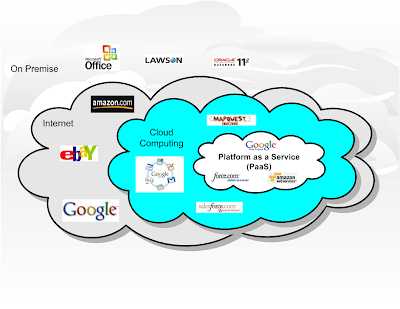
From SOA Slides


You can see from this diagram I created, PaaS takes cloud computing to the next level. Software as a Service (SaaS) are web based applications hosted at a software providers site. PaaS goes one step further and allows a company to run its infrastructure at an infrastructure provider's site. The leaders in this space are Force.com, Amazon's S3, and Google's App Engine. Currently PaaS is far from being mature as witnessed by the recent outages for each of these vendors. Many companies are starting to go the PaaS route with non mission critical applications. Over the next few years, I expect to see these platforms stabilize which will lead to a large shift in mission critical applications moving to the cloud.

So what does this mean to IT shops where technology is not their core competency? As companies move their infrastructure to the cloud, they shift a lot of the work in the areas of system administration and business continuity/disaster recovery to the provider. There will still have to be somebody within the company who is responsible for those areas but the size of these teams will continue to shrink as more systems move to the cloud. As SaaS applications in the areas of ERP, CRM, financial systems and even non business applications like application servers, BPMS and SOA tools move to the cloud, there will be a decreasing need for third party software administration for patches, upgrades, installations, etc. There will also be less development and more integration. This movement starts to commoditize development which makes outsourcing more prevalent. When I add all of these things up, I start to see a world where IT shops are putting more of an emphasis on business SMEs (subject matter experts), architects, and system integrators and a lot less emphasis on custom development and systems administration and network engineers. Before you go nuts, I am not saying that IT shops won't need these skills. I am saying that they won't need as many people to fulfill these roles.

The second area that leads me to believe that IT shops for non-technology companies will get smaller is all of the advancements in telecommunications and social networking. Bandwidth keeps getting faster and cheaper. Within the next five years, streaming media will not be such a burden on corporate intranets. Add to that the plethora of social software that is available on the web and we will start seeing a huge shift towards a mobilized workforce. It's already happening in large companies like IBM. As companies move more work to remote employees and as software becomes more of a commodity, companies might take the opportunity to fight back against rising health care costs and start outsourcing more of this type of work. That does not mean they are going to offshore everything, but they might use a combination of onshore and offshore outsourcing. I have already run across a company in the Tampa Bay area that has gone down this route. They are a bottling company who retains a very small IT shop made up of senior management, a handful of business SMEs, an architecture team, and a PMO. The IT management team works extremely close with the other executives within the company to participate in planning and strategy. All requests for projects come through this C-Level team for approval and funding. Once a project gets approved, it is put out to bid. All of the maintenance and support is off loaded to other firms as well. There is virtually no internal IT staff beyond management and architecture in this firm. It works well for them. I have not talked with them in a few years but I am sure they are looking at PaaS next.

One thing I am not saying here is that these technologies will eliminate jobs. In fact, I see more jobs being created because embracing technology is allowing companies to gain a competitive advantage on the competition who is slow to change. What I do think will happen is that many IT jobs will shift out of the traditional IT shops and move to outsourcing firms and to PaaS providers. The PaaS providers that survive will have multiple facilities across the world. These facilities will have huge data centers with armies of IT people. They will also invest heavily in innovation initiatives as they try to reduce their dependency on electricity and provide a cheaper, greener, and more reliable platform. The picture below shows a Google data center in Oregon. They are leveraging cheap land in areas with water and wind power so they can generate as much of their own energy as possible.


I know that this post may anger some and cause others to think I have lost my mind. I am simply asking some questions and trying to understand where all of this is heading. I have always been fascinated with the evolution of IT and try to understand trends before I get taken by surprise. I remember trying to grasp what the impact of PCs would be when I was a mainframe developer and I remember trying to figure out how the Internet would change our world forever. I knew both of those technologies would change things but not to the level that they have. I think cloud computing, advancements in telecommunications, and social software will combine to create changes even bigger then anything that we have seen in the past.

Dave Linthicum's weekly podcast discusses my article on CIO.com about the top 10 mistakes people make while trying to deliver SOA. Dave does a great job breaking down the list. You can hear the podcast here.

I know the answer to this question. Because we always have. Can we put aside our age old habits of being herded into corporate offices like cattle to sit in cubes (I call them coffins) and try to find some piece and quiet so we can create that next document, model the next design, code the next service, or develop the next prototype? Speaking of old habits, why must our two main sources of collaboration be meetings and email? Many meetings are either about status or some person needs some information to solve a problem and invites everybody under the sun to help. Most of these types of meetings add value to very few people in the meeting at the expense of the others. Isn't it time for a change? As for email, nobody has a better story about ditching email then IBM's Luis Suarez.

Here are a few reasons why I feel that I am much more productive working remotely then at the office:

  1. Fewer distractions
  2. Fewer meetings
  3. More tools
  4. More accountability
  5. No hour lunches
  6. Better work/life balance
Let's discuss each one of these points in more detail:

Fewer Distractions
At the office, people are more willing to interrupt you because they can easily just walk up and ask you a question since they "know where you live". Just walking to get a cup of coffee can turn into a handful of hallway conversations, some work related, some not. When working remotely, people tend to reach out to you only after they have tried to actually find answers to their questions as opposed to just bugging the expert. Don't get me wrong, I love helping my fellow worker, but sometimes it is too easy to ask before people actually think.

Fewer Meetings
Less meetings does not equate to less collaboration. It means less scheduled interruptions. Now some meetings are necessary, but most meetings can be avoided if people were allowed to use collaboration tools to ask and answer questions. Instead of holding numerous meetings, I prefer to have ongoing conversations via some messaging tool (IM, chat, Twitter, etc.). If I really need to focus on a task I can mark myself as away. There are many interesting and free tools that I have been experimenting with that have virtual white boards, video conferencing, and chat all integrated into one platform. Google Groups is another way to set up a collaboration area for discussion threads, document sharing, and archiving.

More tools
Many corporations see tools like instant messaging, chat, Twitter, blogs, wikis and others as a security threat and block them. This is almost comical since everyone simply uses their phones to access these tools anyways. Wouldn't people be more productive using these tools on their computer then on their phone? (See my article called Security or Insecurity?) When you work remotely, you can use the tools of your choice to collaborate. Even if I was forced to use a locked down corporate laptop at home, I would fire up my own PC to get access to the tools I need to do my job.

More accountability
Some may disagree with me on this one. I believe that most worthy employees feel more obligated to focus and deliver because of the perception by management that working remotely allows people to screw off. I know that whenever I telecommuted, I sent my boss an email telling him what I expected to deliver and followed it with updates at the end of the day on what I accomplished. I felt privileged every time I worked from home and felt obligated to prove to management that I was providing value remotely.

No hour lunches
For me personally, a lunch break while working remotely, is the time it takes to get up from my desk, make a sandwich, and return to my desk (5 minutes). A lunch break at work is an escape from the daily grind at the office and usually takes an hour between the drive, ordering, getting served, getting the check, and driving back.

Better work/life balance
When I used to drive into the office every day, I would wake up at 6 to 6:30, catch up on my daily reading, and leave by 7-7:15am. Forty-five minutes and $10 of gas later, I would be at my desk by 8am. Typically I worked until 6-6:30pm and then spent another forty-five minutes and $10 in gas to get home. Now it is after 7pm. I have missed all of the kids sporting events and now its time to do help them with homework. Dinner fits somewhere in between and before you know it is after 9pm and you still have work to do before tomorrow. The cycle continues day in day out.

Now let's look at working remotely. I wake up around 7am. Catch up on my news and technology reading and start working by 8am. I work straight through until 6pm and am able to catch my kids soccer practice if I chose. We can get their homework done earlier, eat at a decent time, and still have time to play a game of Skip-O, tile rummy, or watch the Discovery Channel. Then, if I need to do more work after they go to bed, I am relaxed and feel like I am actually part of the family and not just part of their daily schedule. I also have a few more green backs in my pocket because I am not putting $75 in my tank every three days. Life is good!

Yes it can be done!
CIO.com is running a 3-part series on how a company named Chorus transformed their workforce to be entirely remote. If you look at the typical IT shop today, they are all leveraging some form of outsourcing, whether it is onshore, offshore, or both. In either case, there are a number of workers working remotely from some location other then where the IT shop is based. The irony is that these teams in other countries or in consulting firms within the states are all leveraging several of the tools that I mentioned above to effectively collaborate amongst themselves. I worked on a project recently where the consulting company had a few people onsite, some in Texas, Seattle, and Atlanta, and an offshore team in Macedonia. They were all productive from remote places across the globe. But mysteriously, telecommuting was frowned upon by the corporate culture. Don't figure! What message does that send to the employees of the company? Is it this message..."we trust our vendors to be professionals remotely, but not our own people...."?

Barriers for companies to embrace a remote environment
Having a handful of people working remotely is not a big deal. Mobilizing your workforce is. Part 2 and Part 3 of the CIO.com story about Chorus talks about the planning and the transition that they went through. Here are some of the barriers that I see that prevents companies from embracing remote work.

  1. Perception and resistance to change
  2. Requires capital and must be a priority project
  3. Needs business justification
  4. Requires good management and accountability
Perception/Resistance
Many people perceive that their employees just won't be productive away from the watchful eyes of their managers. For some people this may be true. Then again, why are you paying people that you can't trust? Other people just fear change or won't risk taking on any challenging project.

Capital and Priority
Like any other enterprise initiative, a project of this magnitude requires executive level support, a well thought out strategy and project plan, capital funds, and a high enough priority that the milestones can be achieved. Oh, and don't forget to address the human side of change.

Business Justification
If it is not good for the bottom line, then don't bother. That goes for any project these days. Whether the savings is in reduced leases, power consumption, reduced employee turnover, or whatever, you should never ask for capital without the appropriate justification. While you are at it, don't forget to collect metrics to show management at a later date that the investment was worth it.

Good Management and Accountability
To pull this off, you must work with human resources and put together a policy that clearly set expectations. These guidelines, often part of the employee handbook, should be signed by each person who will be working remotely. But the real key is management. If your management is not doing a good job of making their staff accountable today, good luck trying to make them accountable at home. Maybe the first question to ask is do I have the right management in place to pull this off?

And finally, once a company establishes a remote work force, here are some other advantages that they have.
  1. Hiring - no longer constrained to local markets
  2. Reduced travel expenses
  3. Opportunity to sell real estate assets
Hiring
I realized through my recent experiments with social networking that the recruitment world is much bigger then the local market leads you to believe. With a remote force, I can hire people anywhere in the country and even in the world if I have the proper controls in place. This gives me access to the top talent in the world, not just the top talent in my city. Think about that!

Reduced Travel
A lot of travel is required to hold various meetings with teams that are dispersed across offices. With the proper collaboration tools including video conferencing, virtual whiteboards, and integrated voice/chat, many of these meetings can be performed online. There will still be times where it is critical to have face to face time, but many meetings can be held more cost effective via the Web.

Sell real estate
IBM did this a few years back. Here is a great article from their web site that discusses the benefits of a remote workforce. If a huge company like IBM can pull this off, then there is no reason why any other company cannot. Here are the benefits that IBM gets from mobilizing their workforce.

Productivity. Outfitting employees with mobile technology makes your business more productive because it enables employees to work from home, in transit and while visiting customers, business partners and satellite offices.

Recruitment. The ability to hire the best talent regardless of where they live can give you a leg up on competitors that still rely on a local workforce. And because most potential recruits perceive telecommuting as a benefit, this can provide a considerable advantage to your business by allowing you to fill jobs more quickly. In addition, the business becomes more efficient because lower turnover means less time spent training new employees.

Real-estate savings. With fewer people in the office, real estate expenditures and associated energy costs can potentially be reduced.

Remote computing can also help you avoid the disruption of a major move during a crucial time of growth when the business needs to focus on quality execution. A flexible workforce, often associated with the teleworking model, can also accommodate short-term spikes in business. This enables your business to add office space more judiciously rather than simply reacting to short-term demands.

Business continuity. You never know what’s going to keep your employees away from the office: inclement weather, flu or even traffic tie-ups. When employees have remote access to IT systems, they can continue working no matter what happens in or around your facility.

So what do you think? Is the cost of gas and the improvements in social software making mobile commuting more of a reality then a fantasy? Is your company thinking about this now? I'd love to hear your story.

Subscribe to: Posts (Atom)

My favorite sayings

"If you don't know where you're going, any road will get you there"

"Before you build a better mouse trap, make sure you have some mice"