Enterprise Initiatives

This blog focuses on Enterprise IT topics such as Enterprise Architecture, Portfolio Management, Change Management, Business Process Management, and recaps various technology events and news.


Showing posts with label Linux. Show all posts

I just had a very frustrating experience with the support folks at Dell. Last year I bought three Dell Inspiron 1721 laptops for my wife and two kids. The performance of these laptops were so poor that I switched two of them to Linux. Today I received a notification that my warranty was expiring in five days. It reminded me how badly I was ripped off having to spend about $250 of the $1000 laptop price on Vista which is not capable of performing at acceptable levels on the hardware that Dell sold me. So I decided to call Dell support to see if I could downgrade to XP or get some discounted pricing on memory (a long shot). After over two hours of being passed around like a hot potato from support person to support person, getting disconnected twice, and in the end getting told that they could not help me, I felt obligated to write Michael Dell a letter. I do not expect him to ever read it or anybody at Dell to act on it, but I do feel obligated to rant about it publicly. This is how loyal customers get treated! So here is my email I sent to Michael Dell titled "An angry customer":


Michael,

I have been a loyal Dell customer for over 10 years and have purchased at least 10 PCs and laptops in that time. I have also recommended Dell to my friends and family for years. Today, that loyalty is gone. Last September, I purchased 3 Inspiron 1721 laptops for my wife and two kids. They all had older model Dell's that were hand me downs each time I treated myself to the newest model. I ordered them online and purchased the low end priced model which fit my budget (about $1K each). I wanted to get Ubuntu but the only OS available for these models was Vista. I didn't think that Vista would run well without a ton of memory, but I figured that if Dell only offers Vista on these laptops, then Vista must have acceptable performance on them.

Within a month, due to delays in parts and shipping, I finally received all three laptops. The performance of these laptops are totally unacceptable. My wife and daughter refused to use these machines and went back to their old Dell's running XP. I became so frustrated with these machines that I wiped them out and put Ubuntu on two of them. They run fine now but I can't run some of the software that my kids use. I eventually bought my wife a Mac and she is a happy camper. My son still has Vista because he plays a game that requires a Microsoft OS. Using his computer is such a painful and time consuming experience.

Yesterday I received a letter from Dell asking me to renew my warranty which is set to expire in 5 days. I thought to myself, "Since I am still under warranty, Dell should still be held accountable for selling me laptops that do not have acceptable performance for the base configuration that I selected online". In other words, Dell is selling laptops to consumers that have unacceptable performance and provide no alternatives for better performing operating systems. I did not have a choice to choose anything other then Vista. So I called support hoping that the company would assist a long time loyal customer by allowing me to exchange my Vista license for XP licenses (downgrade to XP) or give me some discount pricing on memory. Had I known that Dell did not have a $1K laptop that had acceptable performance, I would not have bought any, not to mention three of them.

To make a long story short. I spent over 2 hours on the phone getting transferred from one person to the next. Each time I had to reiterate all of the order information, personal information, and my issue. Each time I asked for a manager and was not granted my wish. At two different times I had a support person agree to send me XP licenses at no cost. Both times they transferred me to technical support (don't ask me why) were I was put on hold and eventually received a busy signal. Then I had to call in again and start the entire process over again. Eventually I was able to talk to manager. Once again I had to go through the entire information gathering exercise and the explain my case. Don't you guys use computers? If I have purchased computers from Dell on your web site for 10 years, don't you already have all of my info including my hardware specs? I am able to see all of this info from my side. Oh, you don't do software!

Anyways, this guy (employee # 110337 with a fake US name called "Dave") basically told me that he can't help me and I have to buy the XP licenses or buy more memory. He says that I should have dealt with this issue when I first bought the laptops, not now. My point is that it is still under warranty so it shouldn't matter. Regardless, it is beyond belief to me that your company would sell computers that do not have enough memory to run Vista at an acceptable performance level and then turn your back on a loyal customer who is stuck with three laptops that nobody wants to use. Nobody who buys a brand new laptop should have to wait over 10 minutes to boot it up. And nobody should have to spend over two hours going through your inefficient customer service processes. I would really appreciate it if your company would allow me to downgrade to XP at no cost. But I have such low expectations from Dell now that I am moving on. I am now a new avid Mac fan!

Cheers,

Mike Kavis

P.S. This sounds like a great topic to blog about!


I recently wrote a post called Microsoft Free - One year later that spoke about my experience using all open source products in a corporate environment with mainly Microsoft products. The guys at Gustygeeks.com invited me to be their guest on their weekly show. I recorded a portion of the show which you can hear by clicking play on the media player below. Enjoy!


Get your own playlist at snapdrive.net!


In May of 2007 I wrote a post called Open Source and Microsoft Free. Little did I know that this post would show up on Digg, Slashdot, Craigslist, and several other popular web sites and become a platform for both the Linux and Microsoft camps to wage yet another flame war.

This whole "Microsoft free" experiment started when a colleague of mine challenged me to eat my own dog food after reading many of my posts about my dabbling with open source technologies. The next day, after a few blue screens of death and various issues with Outlook, I grabbed a Ubuntu CD and installed it on my laptop....at work! From that day forward, I have not used a single Microsoft product at work. It has been one year now and I have survived with Thunderbird and Evolution, Open Office, Firefox, and many other open source replacements for Microsoft products.

I put "Microsoft free" in quotes because there are a few exceptions. First, I did install IE 6.0 under wine for that rare occasion that I stumble across a website that only works on IE. Second, there is no answer for Visio. Most of the Visio diagrams that I needed to read were embedded in design documents in Word which I can read with Open Office Writer. But for those that I needed Visio for, I opened them at home on my XP box (I have 1 XP, 1 Vista, and 5 Linux boxes at home). I also used Visio at home when I had to create Visio diagrams. The issue is Visio's proprietary format is not available for developers to write a translation utility for.

With those two issues aside, which represents about 1% of my overall usage on my laptop, my Open Source experience was nearly flawless. Open Office worked remarkably well both receiving Microsoft Office files and creating files in Office format. I exchanged literally thousands of documents between Microsoft Office and Open Office. I never encountered a single issue with Word and Excel and occasionally encountered minor formatting issues with Power Point files. The formatting issues where nothing more then some minor placement issues which probably occurred less then 5% of the time.

Over the course of the year I experimented with Ubuntu, Kubuntu, Freespire, Mepis, and PCLinuxOS. I settled on Kubuntu and recently upgraded with ease to the latest version, Hardy Heron. Here is my analysis of the different Linux distros from last fall. With this "Microsoft free" laptop I have coexisted with 1000+ employees who use XP and various verions of Office including 2007 (the 2007 compatibility add-on works fine). I also delivered presentations at conferences using Open Office Impress and traveled across the country and internationally with no issues with wireless connectivity.

I am not in any camps. I use XP and Linux at home and like both. I gave Outlook the boot years ago at home and do just fine with Thunderbird. It has every feature I need. I do however have problems with Vista. But my message here is not about recommending what tools that my readers should use. My message is that I performed at a high level at work while using Linux, Open Office, and other open source products. These tools did not hinder my ability to do my job and did not impact anyone else at my job. I was able to productively coexist with no Microsoft tools in a Microsoft shop. That is all I am trying to say.

I am not going to recommend to anybody that they change their company standards away from Microsoft. What I will tell you is that open source is a viable alternative that can be used in a production environment. So when you see flame wars where the two camps argue back and forth about their favorite technology, you can point to this post when people claim that Linux and Open Office just won't work in the work place. I have validated that they do work for over 365 days now. Whether we should use these tools at work is a whole different story that really depends on factors like corporate culture, skill sets, budgets, user base, executive support, and many others.

All I can say is that for the last year, I have been using Open Source exclusively and I am loving it!


In part 1, I highlighted four myths (FUD) that I felt needed to be addressed:

  1. OSS is bad for the economy and defies the values of capitalism
  2. OSS support is bad, slow, and/or non-existent
  3. OSS products are second rate ("created in the garage" mentality)
  4. OSS can't be good because it is free
In this post I will discuss the myths about open source support. I have heard every quote from "You can't get support for open source" to "Where are you going to get support, in a chat room?" It is obvious that people who make these statements have not done their homework or just choose to dislike OSS because of their long history of snuggling up with their favorite vendor(s).

There are many options for getting OSS support. I will list six that I am aware of.

Single Vendor Support
Many well established open source projects offer support for a fee. Typically these support fees are minimal when compared to proprietary software where they charge 18-21% of the purchase price. Some projects offer a totally free version of their software with a subset of features but offer an enterprise license with full support that has the complete bundle of features. In either case, this model is similar to the normal proprietary model where you pay for the support of your product. Also, many major software vendors like IBM, Sun, and Oracle are leveraging open source products within their software offerings. In cases like this, these vendors provide support for the OSS products. The only downside to this is they are often not certified on the most recent version of the OSS products.

Stack Vendor Support
In this model, a single company provides support services for a suite of products. Companies like SpikeSource & SourceLabs provide support for a suite of products while Redhat provides support for its own "appstack" which includes jBoss, Red Hat Linux, Apache, MySQL, PostgreSQL, and languages like Perl and PHP. The following diagram is from SpikeSource's web site that shows a few different stacks that are supported.


Community
All OSS products have community support. Many people not familiar with OSS believe that this is nothing more then interacting with some hacker in his garage. This might be true if you are betting your business on a product with a development team of three (which is not highly recommended). But most serious OSS contenders have a huge community following which provides 24x7x365 support from people all around the world. This is where I see an advantage of community support over proprietary software support. In the OSS world, it doesn't matter if you are a billion dollar company or a startup, your issues are equally important and addressed. In the proprietary world, top customers typically get priority over others because huge contracts carry a lot of clout. Many critical fixes and security issues are fixed and patched literally overnight. In fact, if you know how to fix the issue, you can make the changes and submit it to the project team to be reviewed and possibly patched. That beats waiting for the next service patch!

Do It Yourself
You also have the option to not pay any support and fully support the OSS yourself. This makes sense for most non-mission critical products like blogging software (WordPress) and wikis (Mediawiki), but is not recommended for mission critical products like server based Linux and ESB's like Mule.


Use consultants
Another option is to use consultants. This can be individuals who are experts with certain OSS products or companies that specialize in installation and/or support services for various products. You can see a huge list of consulting companies on Sourceforge.net who specialize in certain areas. Some companies use consultants for installations and upgrades, but chose the "Do it yourself" method for everything else. Sourceforge also offers support services for several products.

Mix and Match
The sixth model is to mix and match a combination of the five support models above. Many OSS products rely on a LAMP (Linux, Apache, MySQL, PHP) stack. A company may already have a stack support vendor it deals with and may choose one of the other models to support the specific product. I'll use my Mediawiki example again. Mediawiki may not be a mission critical application at your company, but a few other applications might rely heavily on LAMP, including the wiki. The LAMP stack may already be covered by a stack vendor so you may chose the community or "Do it yourself" models for the wiki.

So the next time somebody tells you that you can't get support for OSS, forward them this link. This myth is pure FUD. I am not saying the all OSS products have good support, but then again, that is true for proprietary vendors also. Part of the vendor selection process for OSS should include your support requirements. If support is critical, make sure you pick a product that has strong support options in one or more of these models.


On the ITToolbox community, we have some very passionate bloggers both for and against open source software (OSS). I am a proponent of both OSS and proprietary software. As an architect, I view both of these as tools in my toolbox. The trick is to know when to use the right tool for the right job. It is unfortunate that some people think there is no place for OSS. Here are a few of the myths (FUD) that I continue to hear from people who insist on depriving their company from leveraging OSS tools even when it may be the best solution for a given problem.

  1. OSS is bad for the economy and defies the values of capitalism
  2. OSS support is bad, slow, and/or non-existent
  3. OSS products are second rate ("created in the garage" mentality)
  4. OSS can't be good because it is free
Myth #1 - OSS is bad for the economy
This could not be further from the truth. Here is a real life scenario from my trip to France last week.
One of our business partners is in the software development business. They are a small company with small IT budgets whose customers are primarily in the retail industry, mainly grocery chains. The retail grocery industry is a very low margin business and one where companies are in real danger of being crushed by the likes of Walmart and Carrefour. These companies are extremely frugal and the big boys have a major say in the price of goods and services. One of our partner's core strategies is to leverage open source technologies to keep both their costs down and to keep the cost of their solutions down. Due to privacy concerns, some of these retailers are demanding that solutions providers shift from the current ASP or SAAS models to a shrink-wrapped model (buying the software and running it locally). This is currently not feasible for companies heavily invested in proprietary software due to the licensing costs of vendor software that is involved. The retailer would have to pay for the operating system, the database, the application server, the BPM tools, the middleware, etc. This would add up to a hefty bill. Using OSS like the LAMP suite (Linux, Apache, MySQL, PhP) and Intalio for BPM, this solution becomes affordable and a competitive advantage to sell to the hundreds of retailers in this space.
Please read this article from Wired called Free! Why $0.00 is the Future of Business so you will understand my next point. Here is an excerpt from the article.
Technology is giving companies greater flexibility in how broadly they can define their markets, allowing them more freedom to give away products or services to one set of customers while selling to another set.

Let's look at this blog for starters. I use free tools to publish my lessons learned and ideas on both Blogspot and ITToolbox. In both cases, a software product and a service was offered to me for free. In return, Google and ITToolbox get value by increasing traffic which increases advertising revenue. I paid nothing for the software or the services. I dedicate a lot of my personal time and expertise to my blogs because I get recognition, increase my network, and I learn from others. So in this case, "Free" is actually a revenue generator and is good for the economy. In the example above, free software allows my company and our business partner to compete by controlling our costs. These OSS products allow us to generate revenue and allows the retailers to improve their products and services by leveraging our loyalty marketing solutions. Once again, "Free" is generating revenue.

The anti-OSS folks argue that OSS is taking food off the plates of developers and giants like Microsoft. Yes this is not good news for Microsoft but there is more to the world's economy then the market share of software giants. Without OSS, this new surge in Social Networking would not be what it is today. Look at all of these new startup companies that have emerged over the last few years. Starting a Internet company from the ground up has never been more affordable. Look at tools like Twitter, Facebook, Wordpress, MediWiki, Joomla and others. These tools are changing the way the world communicates and they are all free. The more collaborative the world is, the stronger the global economy gets. These are all good for the economy.

I believe if people would stop thinking of OSS as Linux versus Windows, we could look past our "religious" beliefs about our favorite operating system and start focusing on things like controlling costs, share holder value, flexibility, negotiating power against vendors, and more. In part two I will discuss the myth about support for OSS. Until then, I look forward to the debate that follows. I ask that we keep it professional!


I have been experimenting with various flavors of Linux over the last several months. The last time I wrote about it I mentioned that on my newer 64 bit laptops, only Mepis could connect to my wireless network out of the box. On the desktops and older hardware, all of the distros that I installed successfully had no compatibility issues with any hardware components. They also could see my network.

This weekend I finally found some time to look into the wireless issues on both the Ubuntu and Kubuntu distributions. After much experimentation and little success, I finally found a thread that solved my problems. In an effort to help others, I felt that I should post my fix here.

This thread is specifically targeted for Dell laptop users running (K)Ubuntu. There are a lot of steps but if you follow them all you will have your laptop connected to your wireless network in no time. Before you start, make sure the wireless switch on the front left hand side of your laptop is in the on position. One note, I did have to make a few minor adjustments to the script that was posted. First of all, I had several commands fail due to permissions. I had to do a few chmod commands to allow write access to various directories and files. Second, there were two wget commands that are issued to retrieve a file from Dell and the ndiswrapper file. I had to precede the commands with the command "sudo" to get the appropriate privileges.

wget http://ftp.us.dell.com/network/R151517.EXE
wget http://superb-east.dl.sourceforge.net/sourceforge/ndiswrapper/ndiswrapper-1.51.tar.gz

should change to

sudo wget http://ftp.us.dell.com/network/R151517.EXE
sudo wget http://superb-east.dl.sourceforge.net/sourceforge/ndiswrapper/ndiswrapper-1.51.tar.gz

Once I finished running all of the necessary commands and rebooted, my wireless light indicator finally shined blue. Then I had to install the Wifi-radar using adept_installer. Once I did that my laptop was able to connect to my network and I became a happy man.

I also had an issue with my sound card. A quick search on the Ubuntu Forum and I found this simple one liner.

sudo apt-get install linux-backports-modules-generic and then reboot.

I cut and pasted the commands, ran it, rebooted, and presto....Sound! If it still does not work for you, make sure your volume controls are not set to low or mute.

So hopefully some people will find this post and quickly resolve their issues on the newer Dell laptops. Once these issues are put to bed, you can sit back and enjoy the experience of a fast, secure, and a free operating system for those like me who dumped Vista.


I was looking back at my first year of blogging to see what my best posts were. For those of you who have read several of my posts you know that I have two favorite topics: open source and SOA. I started blogging in March of this year and have written 120 posts. The top 10 were all dominated by open source articles. The reason is simple, Windows vs. Linux is a hot topic on sites like Digg, Del.icio.us, and Reddit. There are a lot of flame wars out there and not a lot of facts. Most of my posts were related to real work experience with open source and a few were dedicated to an experiment I did at home with several Linux distributions. So for 2007, here are my top 10 posts:

  1. Open Source and Microsoft Free (54,000 hits)
  2. Comparing Linux Distributions - Final Results
  3. Dumping Vista - a Divorce with a Happy Ending
  4. Open Source and Loving it!
  5. Linux Mint is....Mint!
  6. Eating my own Dog Food
  7. Another easy Linux Install, Kubuntu Style
  8. Review of Linux Distributions - Part 2
  9. 10 Reasons why you need an Open Source Strategy
  10. Review of Linux Distributions - Part 1
The top post was a hot ticket on Digg, Slashdot, Craigslist, Stumble, Del.icio.ous, and every Linux website known to mankind. Even though I wrote it several months ago, it continues to get a lot of traffic. Obviously, I am a big advocate of Linux. I have been using Kubuntu at work at a Microsoft shop for most of the year now and have been very productive without a single piece of Microsoft software on my laptop. Linux is ready for primetime. People aren't ready for Linux.


One of the most popular discussions in the blogosphere is the topic of how Linux is posed to start taking market share from Microsoft in the battle of the desktops. What I don't see being discussed too much anymore is how dominating Linux is becoming in the middle tier and backend server space. Not only has Linux been killing Windows in this area but it is also killing mainframes, Unix, and is a favorite choice for grid computing.

Grid computing is an area where Linux makes the most sense to me. Companies like Google and Paypal are clustering thousands of cheap nodes or blades without having to pay a few hundred bucks per node or processor in operating system licensing fees. These companies are also taking advantage of the available source code and making tweaks to customize performance and security to meet their needs. Check out this article about how Paypal leveraged 4000 Linux nodes running RedHat and eliminated the need for an expensive mainframe. Here is a key quote from this article...

In a mainframe environment, the cost to increase capacity a planned 15% or 20% "is enormous. It could be in the tens of millions to do a step increase. In [PayPal's] world, we add hundreds of servers in the course of a couple of nights and the cost is in the thousands, not millions.
I can personally speak to a real life business case for Linux. About eight years ago I worked on a project that had incredible data processing requirements. At that time, the only database technology that existed in the market place that even had the potential to meet our performance requirements was Teradata. They gave us a quote of $34M for the solution which was comprised of proprietary hardware and software. Back then, our entire IT budget was less then $34M. So we built our own solution which ran on a cluster of servers running Red Hat Linux for $100K. Throw in our labor and other fees and we spent close to $1M. What is more amazing is that we did not add a single employee to the staff to run the system since the system is self monitoring and self healing. With the Taradata solution we would have had to add DBA resources. This system is still running today and provides services for a product that generates over $100M a year.

I also stumbled across another article where IT shops are moving off of Unix to Linux for cost savings. A key take away from this article is this quote...
Linux is the best-engineered, most interoperable platform for enterprise computing and is becoming the clear choice for organisations.
So we can debate all day whether Linux is the real deal on the desktop, but in the server world, Linux is king. The irony to me is eight years ago when I was proposing Linux servers (before Linux was cool!), I was getting the same push back and resentment that Linux on the desktop is receiving today. I am sure that three or four years from now I can dig out this post and joke about how people used to fight Linux on the desktop.


Many people are still in denial that Linux is a viable alternative to Windows on the desktop. I have written numerous posts of my experiments with several Linux distributions and my dumping of Vista. In yet another post, I talked about my plans to switch my parents over to Linux.

The next experiment will be my parents. I still have to reset the clock on their VCR every time I go to their house. All they do is read email, surf a few web sites, and play Spades and Mahjong.
Well, that day has come. YiaYia is Greek for grandmother, and YiaYia loves Linux. My parents have an old Dell 4300 with 256MB of RAM. They boot this box and basically leave the room for 15-20 minutes as it struggles to come to life. Even when it does come up it is sluggish and choppy when viewing rich media content. Every time I go to their house I run various tuning and spyware applications with limited impact. My folks where getting ready to buy a brand new PC which would have been a total waste of money for the limited resources that their usage requires. So I convinced them to give Linux a try before they spent their retirement money on a box with enough horsepower to run Vista.

Enter PCLinuxOS. I installed PCLOS in between commercials of the Giants-Lions game on Sunday. My parents are long time AOL users and were still living on the nasty AOL thick client software. I showed them that they can have all of the same functionality on aol.com using Firefox which includes their email. They were able to boot their old clunker PC with PCLOS and get to their AOL mail account in about 3 minutes. The box is humming now and they are extremely happy.

I brought my external hard drive and loaded their PC up with Greek Music and a Live Yanni concert (hey, we're Greek!). Without installing a single additional package, they were able to simply double click on the Yanni video and the video started playing on MPlayer. Then I brought up the music player (I can't remember exactly which tool this was) and it built a music catalog from the files I copied to the disk drive. I set it up to run in random and started the player. PCLOS did a great job of recognizing all of the drivers on this machine out of the box! At that point I think my parents mentioned something about all of those college tuition bills paying off.

I had to leave after the football game and didn't get a chance to finish. Over Thanksgiving I will get my Dad's Hoyle Games and my Mom's Mahjong running under Wine and they will be good to go. My folks are extremely challenged with computers. They don't understand most computer concepts and can only do simple things that require clicking a mouse. They are able to do everything on Linux that they could do on Windows. Without spending a dime, their old PC is now as good as new. The only complaint I heard was my Dad's concern for his Microsoft stock. And to make a good day better, my Giants won.

Last weekend I posted an article called Comparing Linux Distributions where I reviewed eight different Linux distributions on five different machines. I had used the freshly released Beta version of Linux Mint and kept getting read errors on the disk. This weekend I downloaded the real version of Mint 4.0 and was able to install it on my Dell Dimension 4300S. The install was a piece of cake. Mint uses the same 6 step install process that Kubuntu uses. See slideshow for screen shots.


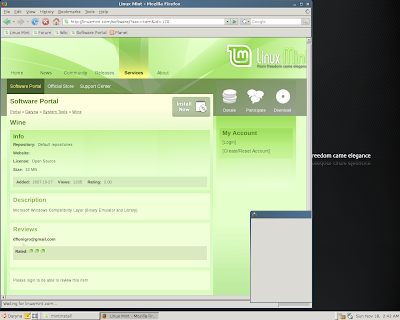
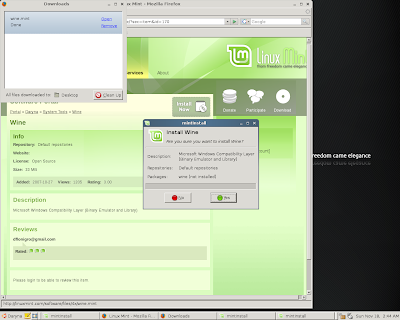
The interface is as refreshing as its name and adding additional software packages is as easy to do as installing software on Windows. In addition to the various package managers that are available, Mint offers the Software Portal. This is a web site for Mint users that allows you to select and install packages just like Windows. Here are some screen shots of the easiest Wine install that I have ever done.

From Linux Mint


From Linux Mint


I was going to include various other screen shots but I stumbled across this post which beat me to it. You can see from this post that updating software and configuring the desktop are about as easy as it gets.

I also installed gOS on an old laptop to give it a spin. It installed easy and has a unique interface that brings all of the Google apps and various social networking tools to the task bar. It was nice, but I quickly got tired of it. This OS is for Linux noobs like Freespire is. If you are comfortable with Linux you probably want to pass on gOS. This is the OS that is shipping on the $200 PCs at Walmart.

And finally, some of my readers asked that I try Suse on one of my 32 bit machines since I couldn't get it to work on the 64 bit laptop. So I downloaded the 32 bit version and tried it on a couple of machines. Unfortunately, I got the same result. It fails when it tries to repartition the disk. I guess I could have used a tool like gParted first and then run Suse, but that defeats the purpose of my experiment. I am looking to see which distro installs the easiest.

One last note, Mepis is still the only distro I tested that was able to connect via wireless on my Dell Inspiron 1721 (AMD Athlon 64x2 Dual-Core TK-53, 1 GB RAM, 64 bit). Only Mepis, Kubuntu, and PCLinuxOS was able to install on it. The others, including Mint all failed on this laptop. On the 32 bit machines, every distro except Suse worked for me. So now my network now consists of 1 Vista, 1 XP, 2 Mepis, 1 Kubuntu, and 1 Mint. I am keeping Vista around to see what Service Pack 1 will do. Besides, struggling with Vista gives me a lot to blog about!


I have been experimenting with many different Linux distributions over the last month as I posted here and here. In my review of the various distributions, I was looking for ease of install and ease of use as the most important factors in my personal ranking system. I believe for Linux to win the desktop war over the next few years they have to appeal to more then just the technical folks who can install distros in their sleep and are wizards at the command line. With that said, here are the distributions I tested:


Distros - 32 Bit

Distros - 64 bit

Disclaimer: I am not an expert at administering desktop software (Windows or Linux). I am very familiar with Unix and Linux operating systems from a software development point of view, but not from an admin point of view. I know enough to be dangerous!

PCs & Laptops used:
  • Laptops
    • IBM Thinkpad, Intel 1.86 GHz, 1.5 GB RAM, 32 Bit
    • Dell Inspiron ME051, Intel Celeron 1.4 GHz, 500 MB RAM, 32 Bit
    • Dell Inspiron 1721, AMD Athlon 64x2 Dual-Core TK-53, 1 GB RAM, 64 Bit
  • PCs
    • Dell Dimension 4300S, Intel 1.70 GHz, 256 MB RAM, 32 Bit
    • Dell Dimension 4700, Intel Pentium4 3.00 GHz, 1 GB RAM, 32 Bit
Overall Observation
  • In general, Linux is very easy to install these days. All distributions have come a long way over the years and no longer requires an experienced administrator to install it.
  • 32-Bit - All distros except Fedora 8 installed easily and worked flawlessly. They also all found my wireless network. Kubuntu Gutsy Gibbon was my favorite by far on a 32-bit archtiecture.
  • 64-Bit - Mepis had the best driver detection for the newer hardware. Only Mepis could connect to my wireless network without manual intervention. Mepis 6.5.02 was my favorite on a 64-bit architecture due to it's excellent ability to detect newer hardware.
  • Best out of the box packages - Kubuntu came installed with Wine (let's you run Windows software on Linux), Adept, and the KDE interface. Kubuntu also comes preinstalled with a nice UI for Wine which made it simple to install Windows programs. I had some issues manually installing Wine on Mepis which are still unresolved to date.
  • Flat out didn't work - OpenSuse 10.3 would not install on the 64-bit laptop. Linux Mint kept giving me disk errors. I downloaded it twice and burned the CD at different speeds. I will try again later because I hear so many good things about Mint. Fedora only worked on one machine. It was getting different error messages on different machines.
  • Honorable Mention - PCLinuxOS has a great user friendly install process and a nice interface. If it would have connected to my wireless network on the 64-bit laptop I would have ranked it above Mepis due to ease of use.
  • Not for Geeks - Freespire was definitely targeting Linux newbies. It is made for people who have never ventured away from Windows. I used it at work for about 2 weeks and I got so annoyed with the interface that I quickly moved to Mepis.
  • Linux at work - As I wrote in the past, I have used Ubuntu at work since April of this year. It has been flawless. I tried Freespire for two weeks and then moved to Mepis. Mepis had some issues with my monitor and wasn't able to work on an overhead projector. I am now on Kubuntu for the last two weeks and it has been working great.
Summary

All of these distros except OpenSuse (couldn't load) are great options for those wanting to move to Linux (I will try Mint again later). For those who are more experienced with administering Linux desktops, you may have come to different conclusions. I did spend a lot of time with most distros performing command line magic to make some things work (especially on the 64-bit environment). Kubuntu and Ubuntu were the only distros where I just installed and went on my way. All others required some amount of tweaking.

I had the luxury of owning several different machines and some time to experiment with the different Linux distributions. Each distribution that I was able to get up and running ran well. I was able to make use out of some old machines that were running poorly on XP. Most importantly, my new laptop that was running Vista very slowly is now cruising with Mepis.

By no means was this a highly scientific experiment. This is the view from a technical guy with limited systems administration skills. Take it for what it's worth. My recommendation is Kubuntu and Mepis.

The family was gone most of Saturday so I took the chance to download and install various Linux distributions. Here is the list that I installed this weekend:

To get started, I first downloaded two open source tools, UTorrent and Active ISO Burner. Who buys software anymore? I downloaded the .iso files for each Linux distribution with UTorrent and burned them as bootable CDs using the ISO burner. Then I downloaded SystemRescueCD and burned it to disk. SystemResuceCD has a variety of tools on it including GParted, a great partition manager tool. All of these Linux distribution tools have a partition manager tool but GParted is the best and most user friendly tool in my opinion. I backed all my important files up over my network onto my new 500G MyBook from Western Digital. I connected it via USB to each PC/Laptop that I was working on and uploaded all of the data to a folder named after the computer. Now the MyBook is connected to my main server and is a shared drive across the network.

Now that I had all my tools and all my CDs ready, I started installing them on various computers. All four installs were simple and straight forward. The Freespire install is probably the best for those who have never seen anything other then Windows in their life. The partition tool was also very intuitive. Kubuntu has an extremely easy 6 step install process. Unless you are getting fancy with partitioning, this should be simple to do. The Mepis install was also very easy although not as intuitive. And finally the Suse install took a couple of tries until it was successful.

Then I tried to get fancy and install multiple distributions on the same laptop. That's when things started going south for me. Keep in mind that I am a software guy, not a system administrator so I am not a pro in this area. After several tries I finally got Mepis and Kubuntu to dual boot from the same laptop. Unfortunately I lost my ability to connect to my wireless network. It was working when I had Mepis running but I think the second distribution may be causing a conflict. I hope to resolve it soon.

My parents were over today and they were using Kubuntu and liked it. If my parents can use Linux, anyone can. They were getting frustrated with their five year old PC running XP and were ready to buy a new one. This week I will convert them to Kubuntu and their PC will start performing for them again. That should save them a few grand.

I took some screenshots of each Linux distribution and posted them on Picasaweb. Feel free to view the slideshows below and go to the photo album for close ups.

Mepis


Freespire


Kubuntu


I have many colleagues and friends who have been through messy divorces. In each case, these poor guys have gone from having the good life, to having issues, to losing half of their assets (or more). I just filed my divorce papers for Microsoft's Vista. In my case, my relationship with Vista never went through the good life period. I gave up half of my assets to "live" with Vista (memory, CPU, performance, costs). But when I split up with Vista, I got it all back!

With all jokes aside, I recently posted my positive experience of installing Kubuntu on an old 1.7GHz machine that was taking 10 minutes to boot up XP. The registry was beyond repair and the various programs like Spybot, Adaware, PitStop, Defrag, and many others did little to improve performance. The desktop was destined for the dumpster. Enter Kubuntu and this PC now works like a champ. I installed Wine on it and got IE 6.0 running on it for those foolish websites that target only the Microsoft browser. My daughter plays various Flash enabled games on Club Penguin. On my brand new Dell Inspiron 1721 laptop running Vista, these games take almost a minute to launch. On my old clunker PC w/only 256MB of Ram it loads in about 3 -5 seconds. That got me thinking.....how would this site perform on my new laptop under Linux?

So I installed Mepis 64 bit on my laptop and wiped out Vista. My daughter launched her game and it loaded instantly. Her exact words were, "Wow, this is so fast". My response was "Good Bye Vista!". So let's take the religion out of this discussion and talk about the investment I just made on my hardware. I bought two brand new identical laptops for $1000 each. These laptops have a Dual-core 64 bit processor with a Gig of memory. Now the Microsoft fanatics would cry, "why would you buy a laptop with only a Gig of memory?" My answer is, my budget doesn't allow for laptops that cost $2K-$3K and the main usage of these laptops are web browsing, email, and word processing. None of those functions require a ton of computer resources. I also have a monster machine (Dell XPS gaming machine) for all of our intense gaming needs (Battlefield 2, Civilization IV, Age of Empires, etc.). So two laptops for $2000 dollars was what I was willing to spend. Unfortunately, Dell did not offer XP or Linux on these machines. The cost of Vista is about $300. So 30% of the cost of my laptops was for an operating system that drained 50% of my resources and performed poorly.

I am not a financial analyst, but that is not a good spend of money. Now that I have eliminated Vista from the equation, I get a better ROI on my investment, even after acknowledging that I threw away $300 worth of software. As I mentioned in a post called Vista - What were they thinking, my wife dislikes Vista so much that she refuses to use the new laptop that I bought her for her birthday (due to it's poor performance). Now she is happy with the laptop running Mepis and the old clunker running Kubuntu.

My plan now is to move all of our computers except the gaming machine to Linux. The gaming machine will stay on XP while the laptops will leverage Wine and virtual machines for those Windows centric programs that won't run on Linux. I will install various Linux distributions and allow for the user to select from a list of distributions when booting the system. Eventually we will probably settle on a distribution like Kubuntu of Freespire that has an interface similar to Windows for an easy transition.


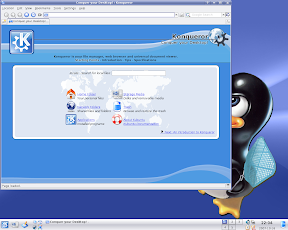
From Kubuntu

So for all of the folks out there who have gone through a messy divorce, divorcing your Vista operating system is the only divorce in town where you get your assets back and still get to keep your kids!


I am doing an experiment at home. I recently purchased two new laptops from Dell for my wife and daughter for their birthday. As I wrote in a previous article, these laptops came loaded with Vista. Vista has completely frustrated my family because of the poor performance, the bugs, and the interface. My wife refuses to use her new laptop so I gave it to my son. I took my daughter's old PC (Dell 4300s with 1.7 GHz, 256MB memory, 40GB disk) that was performing poorly on XP and installed Kubuntu 7.04 on it. The install was incredibly simple despite the myth that Linux is hard to install. The total install took about 70 minutes. Most of that was due to the time it took to partition a very old hard drive. Once the install completed I plugged the PC into my Linksys access point and just like that I was up and running. I was able to see my shared folders on my XP machine and print to my Lexmark x73 scanner/printer.

As I have written in the past, I use Ubuntu at work. A friend of mine recommended Kubuntu so I tested it out at home. Kubuntu has a very nice user friendly interface. It's desktop manager is actually similar to Vista's. Kubuntu comes preloaded with Open Office, chat, dvd burning software, graphics software, the Konquerer browser, and many more open source software packages. This is the first time I used Konquerer and I found it to be equal to if not better then Firefox.

Like Ubuntu's package manager, Kubuntu has the Adept Manager which provides a simple user interface for installing software. For those users who are not hardcore Linux geeks and don't want to mess around with tar files and the like, Adept Manager is the tool for you. There are literally thousands of open source products listed by category and completely searchable. I added Wine, Thunderbird, Firefox, Gimp, and a hand full of other popular tools. I simply clicked the check box next to the desired software, clicked apply, and the Adept Manager did the rest. Who says Linux is hard to install?


So now that I have this up and running on my slowest and oldest machine, I am going to have my wife and kids test it out to see if it meets their needs. If they are comfortable using Kubuntu, which I expect they will be, I will be kicking Vista out of my house. I will always have my Dell XPS gaming machine with XP on it for the rare times where they can't get their needs met on Linux. So far the only thing I can come up with is some of the games we play. Most of the PC usage in my house is internet surfing, email, and office. We have been using Open Office, Firefox, and Thunderbird for years, so this should be a simple transition.

The next experiment will be my parents. I still have to reset the clock on their VCR everytime I go to their house. All they do is read email, surf a few web sites, and play Spades and Mahjong. I am giving them my son's old computer, which is a very good machine, and taking back their old PC. I will mess around with Mepis on that PC. Once I get that installed I will give it back to them with a wireless USB adapter and see how they adapt to Linux. They already struggle with XP so anything will be a challenge for them. If my parents are able to use Linux, then anyone can use it. I'll provide an update on their Linux experience in the next few weeks, assuming that I find time to get them set up.


I found a few interesting real world examples of companies leveraging Open Source as a competitive advantage.

PayPal - Linux and open source software pay off for PayPal

In this scenario, PayPal processes millions of secure financial transactions equating to billions of dollars while leveraging a suite of open source products. Despite the myths, open source provides secure and robust solutions for multi billion dollar companies like eBay, the owner of PayPal.

Travelocity - Check out this video on HP's site

In this example, we are not talking about open source as a free solution. Travelocity partnered with HP to implement a Linux-based platform that improved performance while decreasing costs. Parent company, Sabre Holdings also cut costs by 40% switching to open source database solution MySql.

Amazon - Partners with Pingtel to provide open source enterprise class communications platform.

Pingtel bundles a suite of open source communications products and provides support and services. They offer low cost VOIP solutions that are robust enough for huge companies like Amazon.

I could go on for ever with real life examples of open source products making a difference in the corporate world. When hearing the words "open source", many people associate it with the Microsoft vs. Linux religious wars that rage on endlessly. In reality, "open source" software is changing the way we do business. If your company is not looking at how it can leverage open source, it is not doing its shareholders justice. This does not mean your company should replace its operating system, this means that your company should be looking across the enterprise to see where open source could provide cost reduction, flexibility, and a competitive advantage. There are many great white papers that show how enterprises are implementing open source business models and strategies. We need to educate the decision makers that open source is more about the enterprise and not just about Linux.


I wrote Vista first impressions a few weeks ago and shared my less then happy initial experiences with Vista on the new laptop I bought for my wife. It has been two weeks now and my wife, a typical non-technical user, refuses to use the new laptop. She no longer thinks her four year old laptop running XP is slow because it is twice as fast as her brand spanking new laptop with the resource gobbling Vista on it. So my kids share this laptop and I constantly hear screams of "it's shutting down again!", "why is this so slow?", and "can we trade it in?". This is not what I had in mind when I dropped a grand on the new Dell.

So I keep searching the web to see if anyone is happy with Vista. I go to Microsoft friendly websites like eWeek and PCMag.com and find articles like these:

Night of the Living Vista

The Vista Irrelevancy

Ok, so it's not just me, a pro-Linux guy who is feeling the pain. Popular blogger and pro-Microsoft fan Chris Perillo is not a big fan of Vista either. The more I search the more complaining I encounter. I realize that some of this is people's resistance to change. But I don't recall an all out revolt like this when XP came out. When XP came out, it was a significant improvement over the blue screen, crashing Win95 & Win98 operating systems. Those two versions were absolutely pitiful from a reliability and performance standpoint.

So what the heck was Ballmer and the boys thinking when they spent years developing this bloated resource consuming beast they call Vista? Were they seriously targeting business? Any IT shop that would buy all new computers to upgrade to Vista definitely does not understand the economics of business. Where is the ROI? What do the users get for the investment? Are they ready for the increase in support calls? I've said it before and I'll say it again, the majority of business users spend most of their time using email, browsers, or a third party application (CRM, ERP, etc.). Most users don't need a ton of hardware to perform their daily tasks. Doesn't Microsoft understand this?

For me, I have two options. First is to call Dell and beg for an XP license so I can get off of Vista or second, move to Linux. With the new laptop, we now have five machines in the house. I am moving three to Ubuntu and keeping two on XP. My wife doesn't play any games so she will be fine on Ubuntu. She has been using Firefox, Open Office, and Thunderbird on XP for years so the switch to Linux will be simple for her. My kids play a few Microsoft games like Zoo Tycoon so they will need XP. For me, the only thing I need XP for is Battlefield 2. I have been using Ubuntu at work for six months now and don't miss the constant rebooting, messed up registries, and blue screens.

Yesterday I was on the new laptop and I dragged the Open Office install and setup icon on the desktop to the recycle bin and I got a status bar that went on for over a minute. I finally canceled it, highlighted the icon, and hit the delete key and it deleted it. Little annoyances like this are becoming so common in Vista that I start to question Microsoft's ability to test. We are talking about a new laptop with next to no new software installed on it and minimal usage thus far. What the heck is the user experience going to be like after my kids mess with the laptop for the next few months? All I now is that if my team at work wrote software this bad we would be out of a job.

I'll leave you with this funny Vista installation video on YouTube.


A few months ago, I wrote an article called Open Source and Microsoft Free which discussed my switch from Microsoft XP to Ubuntu at work. In that article I discussed how after seven weeks, I was able to do my job with next to no issues. At the end of the article I recommended a small Linux pilot:

The worst thing that can happen with a small pilot is that you discover that Linux won't work for your organization. At least then you can sleep at night knowing you did your homework and made a strategic decision based on real information.
I have now been Microsoft free at work for almost five months. We had our Linux pilot kickoff meeting yesterday and are preparing to pilot Linux, Open Office, Evolution email client (not replacing Exchange), and Firefox as the standard Open Source image. We have not yet selected which distribution of Linux we want to pilot (we have some more research to do here). For applications that require a Microsoft operating system we have two options. First, we will use Wine to install applications like Visio and IE for those drawings or activeX enabled web sites that don't have Open Source solutions at this time. The second option is to leverage one of our Citrix servers to host applications that will not work well without Microsoft products. We can simply consolidate all of these applications on a single Citrix server and install the Citrix client on each Linux user's desktop.

An important requirement of this pilot is to make sure we address all of the desktop standards that are enforced on our Windows desktops. That means we must address desktop lockdowns, patch management, data encryption and cryptography, virus scanning, and many other security and management features. Our current action item is to review all of these standards and present how we will address each one on our Linux desktops.

For this first pilot we agreed to keep it simple. We will select one Linux distribution, chose a small group of 5-6 users within IT, create a standard image for all pilot users, and create a self sufficient support plan so we don't interfere with the desktop team's day to day commitments. One thing I learned from all of the feedback I received from the last article and from talking to the management team of the desktop group is that doing this in stealth mode can be disruptive and a breach of security. Although the stealth mode initiative got us to this point, I regret not taking a more formal and open approach to a pilot. What I found is that my world is not so anti open source after all. In fact, having an Open Source strategy with an active Linux pilot gives you great leverage the next time you negotiate with Microsoft for Vista and Office 2007 licensing!

Our immediate goal is to collect information to understand the potential usability and support challenges of an enterprise Linux desktop solution. Do I think that we will ever replace Windows at work? Heck no. Do I think we have a substantial amount of users who can be fully functional without the costs of a Microsoft computing environment? Heck yes. The majority of PC and laptop users barely utilize the power of their hardware. They spend most of their time in email, a browser, and in Office. There is always the power users who have much more advanced requirements. But for the average computer user, the basic usage can easily be replaced with Open Source solutions.

I will continue to write periodic updates about our lessons learned over the next several months. I would welcome constructive feedback and would love to hear your experiences if you have been down this road before.


I just read two really interesting articles (Giving proprietary vendors a run for their money & Could Linux become the dominant OS?). These articles and a discussion I had yesterday about budget constraints for the next calendar year makes me think that Open Source Software (OSS) is on the verge of becoming mainstream over the next few years. I have already seen the statistics where 51% of companies are using OSS in mission critical applications. This is starting to look very similar to the days where everyone was fleeing the mainframe for client server technology. The client server craze was driven by lower cost and greater flexibility. Does that sound familiar?

Back to my budget discussion. I was having a discussion with a peer about budget constraints for the upcoming year. Our budgets typically remain flat or slightly increase each year. But each year the cost of doing business rises so we really have less to work with. We have been leveraging newer technologies, like virtualization, disk consolidation and compression, and others that have been driving costs down. Over the past few years we have been dealing with our budget constraints through technology improvements in the hardware area. Now its time to look at software.

As I look at the back end servers, I can't see how we can continue to justify spending the money on licenses and maintenance for proprietary operating systems like AIX or SCO or Windows 2003 unless the applications we are serving up mandate them. For example, we obviously need a Windows server to run Exchange, but many third party packages we buy give us the option of Windows or Linux. For those worried about support for OSS, read this article about open source service providers. With the advancements in virtualization, I should be able to create as many test and development environments I need as long as I don't have to continue paying for the OS licenses. Linux gives me that flexibility. I think a good strategy this year is to look at all of your software assets to see if there are candidates to move off of proprietary solutions to open source solutions. Once you have identified the candidates, put a plan together for replacing these systems over time.

Then I started looking further down the road. I have written many articles about my concerns with Vista and how this might be the right time to start a Linux on the desktop pilot. With the potential of Linux on the desktop being introduced to the enterprise over the next few years, coupled with applications moving towards SaaS models and rich AJAX enabled interfaces, does it still make sense to leverage .Net technologies and force the .Net framework and ActiveX controls on clients? If it makes sense to reduce licensing costs at the middle tier, Java, Ruby, or LAMP technologies sure look like better solutions.

So as I look down the road and see a continuous push to reduce costs while increasing value, I wonder how much proprietary software companies will be purchasing 5-10 years from now. Will it be like the mainframe where the only systems left standing are the ones that have no cost justification to replace? Will the norm be that new applications move to OSS? I know we are still a few years away from this but OSS is becoming more mainstream and widely acceptable in corporate IT whether we want to admit it or not.


In Part 1 of this series, I explained my reasoning behind creating an open source strategy. In Part 2, I will discuss our progress. But before I start, here are some predictions from Gartner:

  • By 2010, 75 percent of mainstream IT shops will have a formal open source acquisition policy in place.
  • By 2008, open source will compete with closed source in every infrastructure market.
  • By 2010, mainstream IT shops will consider open source for 80 percent of their infrastructure software needs.
  • By 2010, mainstream IT shops will consider open source for 25 percent of their business software needs.
Our first step was to create an inventory of the open source products that we use at my IT shop. We have a few areas within the organization that were early adopters of OSS and have a variety of products in use. When polling the staff for OSS products, I expected to find between 20-30 actively being used. I was shocked to find that we have around 100 different OSS products in our inventory (not including the ones packaged within proprietary closed software products). What an eye opener!

There is a lessoned learned here. Since the company as a whole still has not fully embraced OSS and still looks at OSS as the red headed step child, individuals have gone into stealth mode and started assembling a massive inventory of products that help them get there job done at a very low cost. What I found out is that we have a lot of duplication of products including various different versions. Some of the products are best of breed while others are questionable. If there is ever a need of a strategy, the time is now! Since we rely so heavily on OSS, we must embrace it as a strategic part of our enterprise and put the necessary governance around it. This takes us to step two of our strategy.

Today we spent a couple of hours with Sourcelabs, an open source service provider. This was another eye opening event for me. I knew open source service providers provide support for a wide range of OSS products. But here are a few things they do that I didn't know:
  • Stress test and certify OSS products
  • Contribute code to numerous OSS products
  • Provide a one stop self service portal with information on numerous OSS products, including patches security alerts, product roadmaps, known issues, etc.
  • Provide advice and guidance for product evaluations
  • Assist in the creation and/or validation of your Open Source Strategy
  • Fix product bugs and submit to the product's community for the next patch or release
  • Provide certified Java middleware suites
  • Provide open source policy and process best practices
All of this from one vendor across a whole suite of tools. This is so much more cost effective then paying 20% maintenance on every single product you buy in the world of proprietary software. We have a use case where we purchased a 20 node cluster of servers from a major vendor. We were required to purchase support for each node. The vendor mandated that we use SUSE Enterprise which more then doubled the cost per node. To make matters worse, the vendor is one to two years behind in the version of SUSE that they support on their hardware. The reality is that these servers just run and we rarely need any support for the operating system. So how cost effective is that model? For this use case, service providers are a no brainer. Not only is it more cost effective, but we can also choose whatever distribution of Linux we want because the service providers do not mandate what software we must use. Suddenly, the overall price of the cluster just dropped in half. Now for the same price (and better support) I can purchase a second cluster and drop it at our disaster recovery site!

So much for the myth that you can't get support for OSS. So to recap where we are with our strategy:
  • Step 1 - create an inventory
  • Step 2 - educate IT - this started today with our discussion w/Sourcelabs
I will continue this series as we move forward with our strategy. If any of the readers out there have experience with this process I would much appreciate hearing your lessons learned and recommendations.


Back when Jaws was still considered a scary movie, the mainframe dominated the hardware marketplace. Well, Just when you thought it was safe to get back in the water, the mainframe or at least the mainframe mentality, is coming back.

Virtualization is as hot of a topic as BPM and SOA these days. Companies are saving millions of dollars by consolidating hundreds or even thousands of individual servers onto small clusters of servers serving up virtual machines. Other drivers for this technology are reductions in energy, emissions, and floor space, improved manageability, and easier disaster recovery strategies.

The Butler group published an article called, "The King is Dead - Long Live the Mainframe". If you have the time, this article is a great read. Here is a quote from the article:

We believe the wider adoption of the mainframe beyond these markets will be influenced by developments in the Service Oriented Architecture (SOA) paradigm, and the impact that the advancements in the capabilities of x86 server virtualisation is having in the market.
One of the many reasons for the decline in mainframe usage over the years is the lack of products that are available for the mainframe platform. This is changing as Linux can now be the OS of choice on the mainframe. The article continues with this quote:
Another argument against mainframes has been the lack of commercially available software developed on the platform, which at best tends to be ported to the system at a later date, or not at all in some cases. This has created the ‘inhouse’ or customised solutions that have become associated with many mainframe implementations. However, since IBM announced support for Linux on its Z series this has become less of an issue.
But even if companies are not considering mainframes as a platform for virtualizing their enterprise, one can't help but see the resemblance of today's virtual infrastructure with the mainframe infrastructure of the days gone by.

As I continue to research the virtualization movement, I keep stumbling across articles that point to various issues and challenges with virtualization. These range from security to inadequate monitoring and managing tools. When companies like VMWare and Open Source solutions like Xen resolve these issues, won't these solutions closely resemble the mainframe? If you think about it, the virtual server concept is basically the same thing as LPARs. The architecture behind the mainframes of yesterday are starting to look very similar to the architecture behind virtualization today.

IBM is using this opportunity to revitalize its mainframe sales. Most of their sales in recent years can be attributed to the fact that companies cannot afford the cost to migrate off of the years of legacy built on top of mainframe technology. Now, IBM can leverage the new mainframes running Linux as a solution to virtualization and Green IT initiatives. And by the way, the are eating their own dog food too.

IBM saves $250 million consolidating Linux servers on to mainframes

Subscribe to: Posts (Atom)

My favorite sayings

"If you don't know where you're going, any road will get you there"

"Before you build a better mouse trap, make sure you have some mice"