Enterprise Initiatives

This blog focuses on Enterprise IT topics such as Enterprise Architecture, Portfolio Management, Change Management, Business Process Management, and recaps various technology events and news.


I have been blogging about our BPM and SOA initiative all year long. Yesterday, we deployed our first application, a customer facing B2B portal that spans our sales order process. Although this is just the first iteration of many and we are still a few months away from delivering the features that will give us the big ROI, this was a major milestone for us. So I would like to take this opportunity to share a few things we did right. In part 2, I will discuss a few things I would do different next time.

Things we did right

  1. Focused on business not technology - we performed a 90 day business process assessment where we documented current state, brain stormed on future state, and defined a portfolio of projects that each had their own ROI. This allowed us to sell the business on BPM and SOA and helped us secure the funds required to take on SOA.
  2. We did our homework - We attended conferences, read blogs, researched web sites, collaborated with experience architects, and a got our hands on anything or anyone that had any information about SOA.
  3. Thorough POC - We invested a lot of time in an extensive vendor assessment for both the BPM and SOA tools. When we narrowed it down to the short list of vendors we brought them each in for a full day proof of concept. I wrote a piece on CIO.com called the Proof is in the Pudding and another called Beware of Eye Candy that talks about some of the scary things you might find when you start going beyond the Power Point slides and start actually trying to execute processes and services.
  4. Surrounded ourselves with talent - We put several of our best people on this project on both the IT and business side. Not only did we look for talent, but we looked for motivated people who embrace change and bought into the vision. We also partnered with an implementation company with years of SOA experience including working on some of the largest SOA implementations in the world. We embedded our architects with our SOA partners to accelerate the learning curve.
  5. Strong executive support - Our executive sponsor is from the business and the person who went to the top to get the funding for the project. Like a couple of us in IT, she put her career on the line by signing up to deliver substantial ROI numbers over the next four years. You can bet that we have all the support we need. Recently, the CEO declared this one of the key initiatives over the next four years so now the whole company is behind this.
  6. Squash resistance instantly - Any time we encountered or were told of resistance or negativity, we immediately addressed it head on. Some of these occurrences turned out to be great learning opportunities while others were the result of lack of buy in. In each case, we tried to understand the root cause and resolve the issue before it spread like a fungus.
  7. Short, iterative deliverables - Many companies get themselves into trouble by trying to tackle too much out of the gates. We took a look at all of the projects that we identified and used a combination of portfolio management and a SOA roadmap to determine the priority and size of the scope for each project. By laying out the long term vision, we were able to prioritize which services to build first to maximize reuse and reduce the overall cost of deployment.
  8. Sound architecture - We are laying the foundation for a loosely coupled, service enabled architecture that will give us a platform to quickly react to change. We are leveraging both Portal and BPM technology to create new tools that empower our users with self service capabilities, visibility into the workflow, and access to KPIs through Business Activity Monitoring (BAM). We are also leveraging SOA to connect this new front end to our years of legacy systems while hiding the complexity from the users.
  9. Having Fun - We are all under intense pressure to deliver the numbers we promised in aggressive time frames. The work is challenging and we had a few "coming to Jesus" meetings along the way, but overall all we are extremely excited and focused on future successes. At the same time we are enjoying being part of an initiative that will transform the company.
I know this sounds like a bed of roses but this success has not come easy. In my next post I will describe some of the things that occurred that we will may sure never happen again. The list is as long as the one above.


One of the most popular discussions in the blogosphere is the topic of how Linux is posed to start taking market share from Microsoft in the battle of the desktops. What I don't see being discussed too much anymore is how dominating Linux is becoming in the middle tier and backend server space. Not only has Linux been killing Windows in this area but it is also killing mainframes, Unix, and is a favorite choice for grid computing.

Grid computing is an area where Linux makes the most sense to me. Companies like Google and Paypal are clustering thousands of cheap nodes or blades without having to pay a few hundred bucks per node or processor in operating system licensing fees. These companies are also taking advantage of the available source code and making tweaks to customize performance and security to meet their needs. Check out this article about how Paypal leveraged 4000 Linux nodes running RedHat and eliminated the need for an expensive mainframe. Here is a key quote from this article...

In a mainframe environment, the cost to increase capacity a planned 15% or 20% "is enormous. It could be in the tens of millions to do a step increase. In [PayPal's] world, we add hundreds of servers in the course of a couple of nights and the cost is in the thousands, not millions.
I can personally speak to a real life business case for Linux. About eight years ago I worked on a project that had incredible data processing requirements. At that time, the only database technology that existed in the market place that even had the potential to meet our performance requirements was Teradata. They gave us a quote of $34M for the solution which was comprised of proprietary hardware and software. Back then, our entire IT budget was less then $34M. So we built our own solution which ran on a cluster of servers running Red Hat Linux for $100K. Throw in our labor and other fees and we spent close to $1M. What is more amazing is that we did not add a single employee to the staff to run the system since the system is self monitoring and self healing. With the Taradata solution we would have had to add DBA resources. This system is still running today and provides services for a product that generates over $100M a year.

I also stumbled across another article where IT shops are moving off of Unix to Linux for cost savings. A key take away from this article is this quote...
Linux is the best-engineered, most interoperable platform for enterprise computing and is becoming the clear choice for organisations.
So we can debate all day whether Linux is the real deal on the desktop, but in the server world, Linux is king. The irony to me is eight years ago when I was proposing Linux servers (before Linux was cool!), I was getting the same push back and resentment that Linux on the desktop is receiving today. I am sure that three or four years from now I can dig out this post and joke about how people used to fight Linux on the desktop.


Over the last 18-24 months I have researched and taken on a number of Enterprise Initiatives such as Enterprise Architecture, BPM, SOA, and agile development to name a few. As I researched each topic I found tons of articles recommending to steer far away from each initiative. The common theme is that it is expensive, too hard to do, and most initiatives fall. Today I was researching Enterprise Metadata and many of the search results pointed towards doom and failure.

Why is there so much failure with these all important initiatives? I did some research and found that a large amount of normal projects fail at equally high rates. The enterprise initiatives are just more visible and usually require a significant upfront investment. So what are the common reasons for failed projects? An article at Gantthead.com provides the following list:

  • Inadequately trained and/or inexperienced project managers
  • Failure to set and manage expectations
  • Poor leadership at any and all levels
  • Failure to adequately identify, document and track requirements
  • Poor plans and planning processes
  • Poor effort estimation
  • Cultural and ethical misalignment
  • Misalignment between the project team and the business or other organization it serves
  • Inadequate or misused methods
  • Inadequate communication, including progress tracking and reporting
For enterprise initiatives I would add these:
  • Lack of strong executive sponsorship
  • Unrealistic scope ("boiling the ocean")
  • Lack of governance
So the next time you start researching a large IT initiative and you see all the negative publicity about your chances of success, ask yourself these questions:
  1. Do we have the leadership required to take on this project?
  2. Do we have enough change agents to change our culture?
  3. Will we be able to get enough funding to adequately meet our objectives?
  4. Will we get the support from the executives and/or the business?
If the answer to any of these questions is "no", then you might want to listen to the warnings from the articles. If the answers to all of these are "yes", then it all comes down to how good of a plan you put together and how well you execute the plan. Don't be risk adverse and let fear get in the way.


Many people are still in denial that Linux is a viable alternative to Windows on the desktop. I have written numerous posts of my experiments with several Linux distributions and my dumping of Vista. In yet another post, I talked about my plans to switch my parents over to Linux.

The next experiment will be my parents. I still have to reset the clock on their VCR every time I go to their house. All they do is read email, surf a few web sites, and play Spades and Mahjong.
Well, that day has come. YiaYia is Greek for grandmother, and YiaYia loves Linux. My parents have an old Dell 4300 with 256MB of RAM. They boot this box and basically leave the room for 15-20 minutes as it struggles to come to life. Even when it does come up it is sluggish and choppy when viewing rich media content. Every time I go to their house I run various tuning and spyware applications with limited impact. My folks where getting ready to buy a brand new PC which would have been a total waste of money for the limited resources that their usage requires. So I convinced them to give Linux a try before they spent their retirement money on a box with enough horsepower to run Vista.

Enter PCLinuxOS. I installed PCLOS in between commercials of the Giants-Lions game on Sunday. My parents are long time AOL users and were still living on the nasty AOL thick client software. I showed them that they can have all of the same functionality on aol.com using Firefox which includes their email. They were able to boot their old clunker PC with PCLOS and get to their AOL mail account in about 3 minutes. The box is humming now and they are extremely happy.

I brought my external hard drive and loaded their PC up with Greek Music and a Live Yanni concert (hey, we're Greek!). Without installing a single additional package, they were able to simply double click on the Yanni video and the video started playing on MPlayer. Then I brought up the music player (I can't remember exactly which tool this was) and it built a music catalog from the files I copied to the disk drive. I set it up to run in random and started the player. PCLOS did a great job of recognizing all of the drivers on this machine out of the box! At that point I think my parents mentioned something about all of those college tuition bills paying off.

I had to leave after the football game and didn't get a chance to finish. Over Thanksgiving I will get my Dad's Hoyle Games and my Mom's Mahjong running under Wine and they will be good to go. My folks are extremely challenged with computers. They don't understand most computer concepts and can only do simple things that require clicking a mouse. They are able to do everything on Linux that they could do on Windows. Without spending a dime, their old PC is now as good as new. The only complaint I heard was my Dad's concern for his Microsoft stock. And to make a good day better, my Giants won.

Last weekend I posted an article called Comparing Linux Distributions where I reviewed eight different Linux distributions on five different machines. I had used the freshly released Beta version of Linux Mint and kept getting read errors on the disk. This weekend I downloaded the real version of Mint 4.0 and was able to install it on my Dell Dimension 4300S. The install was a piece of cake. Mint uses the same 6 step install process that Kubuntu uses. See slideshow for screen shots.


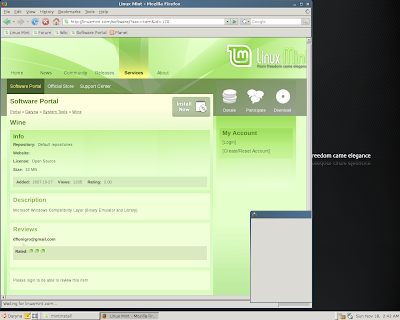
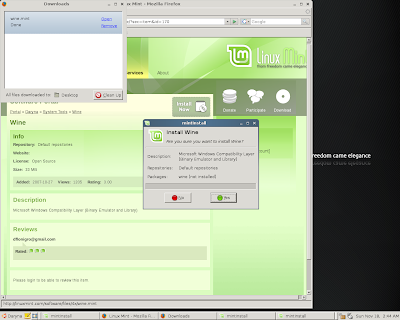
The interface is as refreshing as its name and adding additional software packages is as easy to do as installing software on Windows. In addition to the various package managers that are available, Mint offers the Software Portal. This is a web site for Mint users that allows you to select and install packages just like Windows. Here are some screen shots of the easiest Wine install that I have ever done.

From Linux Mint


From Linux Mint


I was going to include various other screen shots but I stumbled across this post which beat me to it. You can see from this post that updating software and configuring the desktop are about as easy as it gets.

I also installed gOS on an old laptop to give it a spin. It installed easy and has a unique interface that brings all of the Google apps and various social networking tools to the task bar. It was nice, but I quickly got tired of it. This OS is for Linux noobs like Freespire is. If you are comfortable with Linux you probably want to pass on gOS. This is the OS that is shipping on the $200 PCs at Walmart.

And finally, some of my readers asked that I try Suse on one of my 32 bit machines since I couldn't get it to work on the 64 bit laptop. So I downloaded the 32 bit version and tried it on a couple of machines. Unfortunately, I got the same result. It fails when it tries to repartition the disk. I guess I could have used a tool like gParted first and then run Suse, but that defeats the purpose of my experiment. I am looking to see which distro installs the easiest.

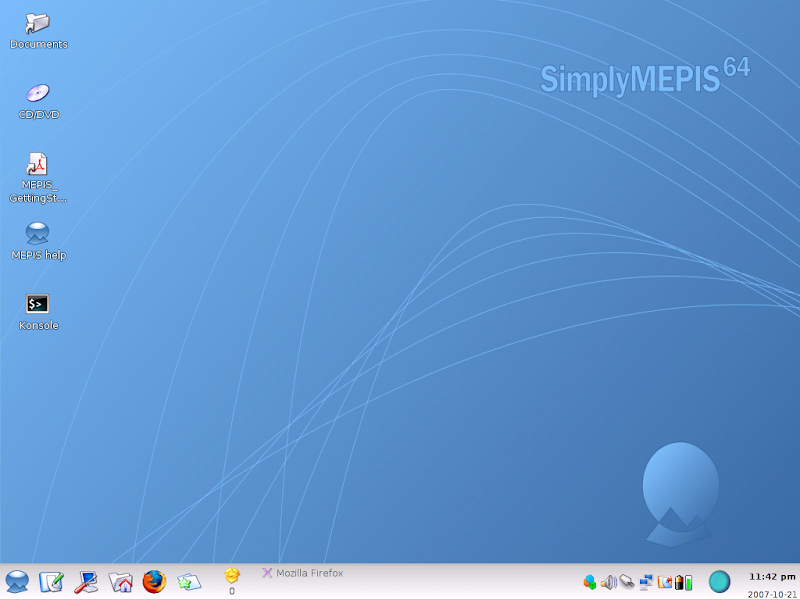
One last note, Mepis is still the only distro I tested that was able to connect via wireless on my Dell Inspiron 1721 (AMD Athlon 64x2 Dual-Core TK-53, 1 GB RAM, 64 bit). Only Mepis, Kubuntu, and PCLinuxOS was able to install on it. The others, including Mint all failed on this laptop. On the 32 bit machines, every distro except Suse worked for me. So now my network now consists of 1 Vista, 1 XP, 2 Mepis, 1 Kubuntu, and 1 Mint. I am keeping Vista around to see what Service Pack 1 will do. Besides, struggling with Vista gives me a lot to blog about!


Zapthink posted an interesting description of a role they call VP of SOA. Todd Biske argued that many of the tasks in this role belong to the Chief Architect and a dedicated role of VP of SOA is unjustified. My view is somewhere in between. As someone trying to fulfill both the role of the Chief Architect and the role Zapthink describes as the VP of SOA, I can honestly say that this can be a lot to juggle. I have fallen victim to becoming so engaged in the VP of SOA role that at times I am not totally fulfilling my duties as the Chief Architect. After all, the Chief Architect is responsible for the architecture of the entire enterprise, which SOA is a subset of. My solution is not to create another high paying role like the VP of SOA but instead give my enterprise architects more responsibility and decision making power to free me up enough to take on SOA and EA. This creates a cascading effect where the tech leads then need to step up to the plate and take on some of the enterprise architects' tasks. This creates opportunities for many people as opposed to one highly paid guru and allows you to build a stronger team over time.

I work in a 200 person IT shop so creating VP positions is harder to come by then if I worked in a 1200 person IT shop. In a larger company, especially one with a distributed IT staff, I can definitely see the justification for a VP of SOA. In a centralized IT shop like the one I work in, I think the VP of SOA and the Chief Architect should be the same person. Your thoughts?


I have been experimenting with many different Linux distributions over the last month as I posted here and here. In my review of the various distributions, I was looking for ease of install and ease of use as the most important factors in my personal ranking system. I believe for Linux to win the desktop war over the next few years they have to appeal to more then just the technical folks who can install distros in their sleep and are wizards at the command line. With that said, here are the distributions I tested:


Distros - 32 Bit

Distros - 64 bit

Disclaimer: I am not an expert at administering desktop software (Windows or Linux). I am very familiar with Unix and Linux operating systems from a software development point of view, but not from an admin point of view. I know enough to be dangerous!

PCs & Laptops used:
  • Laptops
    • IBM Thinkpad, Intel 1.86 GHz, 1.5 GB RAM, 32 Bit
    • Dell Inspiron ME051, Intel Celeron 1.4 GHz, 500 MB RAM, 32 Bit
    • Dell Inspiron 1721, AMD Athlon 64x2 Dual-Core TK-53, 1 GB RAM, 64 Bit
  • PCs
    • Dell Dimension 4300S, Intel 1.70 GHz, 256 MB RAM, 32 Bit
    • Dell Dimension 4700, Intel Pentium4 3.00 GHz, 1 GB RAM, 32 Bit
Overall Observation
  • In general, Linux is very easy to install these days. All distributions have come a long way over the years and no longer requires an experienced administrator to install it.
  • 32-Bit - All distros except Fedora 8 installed easily and worked flawlessly. They also all found my wireless network. Kubuntu Gutsy Gibbon was my favorite by far on a 32-bit archtiecture.
  • 64-Bit - Mepis had the best driver detection for the newer hardware. Only Mepis could connect to my wireless network without manual intervention. Mepis 6.5.02 was my favorite on a 64-bit architecture due to it's excellent ability to detect newer hardware.
  • Best out of the box packages - Kubuntu came installed with Wine (let's you run Windows software on Linux), Adept, and the KDE interface. Kubuntu also comes preinstalled with a nice UI for Wine which made it simple to install Windows programs. I had some issues manually installing Wine on Mepis which are still unresolved to date.
  • Flat out didn't work - OpenSuse 10.3 would not install on the 64-bit laptop. Linux Mint kept giving me disk errors. I downloaded it twice and burned the CD at different speeds. I will try again later because I hear so many good things about Mint. Fedora only worked on one machine. It was getting different error messages on different machines.
  • Honorable Mention - PCLinuxOS has a great user friendly install process and a nice interface. If it would have connected to my wireless network on the 64-bit laptop I would have ranked it above Mepis due to ease of use.
  • Not for Geeks - Freespire was definitely targeting Linux newbies. It is made for people who have never ventured away from Windows. I used it at work for about 2 weeks and I got so annoyed with the interface that I quickly moved to Mepis.
  • Linux at work - As I wrote in the past, I have used Ubuntu at work since April of this year. It has been flawless. I tried Freespire for two weeks and then moved to Mepis. Mepis had some issues with my monitor and wasn't able to work on an overhead projector. I am now on Kubuntu for the last two weeks and it has been working great.
Summary

All of these distros except OpenSuse (couldn't load) are great options for those wanting to move to Linux (I will try Mint again later). For those who are more experienced with administering Linux desktops, you may have come to different conclusions. I did spend a lot of time with most distros performing command line magic to make some things work (especially on the 64-bit environment). Kubuntu and Ubuntu were the only distros where I just installed and went on my way. All others required some amount of tweaking.

I had the luxury of owning several different machines and some time to experiment with the different Linux distributions. Each distribution that I was able to get up and running ran well. I was able to make use out of some old machines that were running poorly on XP. Most importantly, my new laptop that was running Vista very slowly is now cruising with Mepis.

By no means was this a highly scientific experiment. This is the view from a technical guy with limited systems administration skills. Take it for what it's worth. My recommendation is Kubuntu and Mepis.


As an employee of a small-to-medium sized business (SMB), I find myself constantly questioning how proprietary software vendors are going to be able to compete with Open Source Software in the SMB space over the next few years. I am in the middle of a full blown SOA and BPM initiative. We have spent a few bucks on the SOA stack from a major vendor betting on the fact that there was a lot of value in an integrated stack. The reality is that the big vendors are buying pure play vendors to complete their suite of SOA tools and these products are still 12-18 months away from being fully integrated. In other words, the integration is not there yet.

We are now looking at tools in the areas of SOA Governance, SOA Testing, and registries and repositories. The cost of procuring commercial software products for these tools exceeds the cost of the entire SOA stack (BPM, ESB, and Data Services)! It was hard enough to get the funding to purchase the stack. It will be even harder to get the funds for tools such as these that are transparent to the users. IT must fund these tools. Of course, most SMB IT shops are working on limited budgets that are flat or modestly increased year after year. Salaries and rising health insurance costs eat up the budget and IT must find creative ways to make up the difference. Spending a ton of money on governance tools is not my idea of creative cost reduction.

We have been evaluating several vendor solutions recently. These tools are built with features to satisfy every customer possible. SMB's do not have the resources that can be dedicated to these tools to take advantage of even 50% of the features. In my case, the team that would administer these tools are already responsible for many other tools. What this equates to is paying big bucks for rich features that I can't use. It's like buying an RV for a 5 mile commute to work.

Then there are the open source solutions. There are several viable options like Centrasite for the registry/repository which provides most of the necessary features that we need. For those few features that are lacking we can pay a small fee for the enterprise addition or just add the features to the code ourselves. SOA is just one area where I see SMB's favoring Open Source Software over the big proprietary vendors. Portal, Content Management (ECM), ERP, and CRM are other examples. Like SOA, ERP, CRM, and ECM software is typically way too expensive for SMB's. Open Source allows companies with smaller budgets to take advantage of these technologies. Many people who are anti open source or who just haven't been keeping up with how far Open Source Software has come over the past few years will question the robustness of the feature set, the integration, the support, and the quality of the software. Let me addres each issue one at a time:

  1. Feature set - As I stated above, SMB's typically don't need or don't have the resources to even use many of the features in the big vendor enterprise packages. Out of necessity, most SMB's need to keep things simple and manageable and use only what makes sense.
  2. Integration - I laugh when big vendors raise flags about Open Source and integration. The big vendors' products have so many integration issues amongst their own products because half of their products are the result of pure play purchases. They usually have to bring in sales people from four or five different divisions (former pure play companies) just to answer your basic questions.
  3. Support - Nothing is more frustrating then paying 20% of the purchase price for maintenance annually to have some college kid from India search a knowledge base article on the web in an attempt to solve your support problems. Even when you get your case escalated to people who actually know the product, SMB's rarely get the necessary priority because the vendors cater to their billion dollar customers. SMB's typically can't afford platinum level support which gets you immediate attention when you have issues. My experience with Open Source support has been extremely responsive. There are also Open Source Service Providers whose core competency is support.
  4. Quality - This is the myth of myths. How can you beat the global peer review process in the world of Open Source? You literally have hundreds of sets of eyes reviewing and testing code. My colleague Eric Roch will say that commercial software is in the state of "Perpetual Beta". The vendors are in such a rush to get a leg up on the competition that they are sacrificing quality for release dates. I see this with SOA where vendors are pushing product out the door too fast to the extent where I feel like a beta tester instead of a paying customer.
In addition to all of this, you have mass consolidation going on in the industry. Oracle, HP, IBM, and Microsoft continue to gobble up their competition. They then try to sell you a suite of very disjointed and overlapping products. At the same time they are rapidly trying to integrate their new products into a common platform. At the end of the day you have a lot of very expensive technologies that are fragile, complicated, and redundant.

Another advantage of Open Source software is you can try before you buy. I can start using a light weight registry/repository and learn what features are really important to me. This could be a better plan then buying the full blown feature rich six-figure proprietary solution only to find out that I only need 25% of the features.

For those of you with billion dollar budgets, all of this may seem like nonsense. For those of us who have to find creative ways to move IT forward within the constraints of modest budgets, investing in Open Source Software is a great way to stay competitive and deliver modern technology to support your business's goals and objectives.


I was reading various blog posts with my Google Reader today and came across a few articles that are riding the excitement of Web 2.0 and appending the "2.0" nomenclature to their subject matter to attract attention. Don't get me wrong, I am a big fan of Web 2.0 and the direction the web is going, but the 2.0 thing has got to go. Here are a few examples of what littered my feed reader today:

  • Governance 2.0 - I think governance is on about 84.0 by now.
  • Enterprise 2.0 - Fancy name for Web 2.0 at work, call it what it is!
  • Sales 2.0 - Sales people using Web 2.0 tools, I feel the nausea kicking in now.
  • CRM 2.0 - Mercy!
How many 2.0's can there be? So off to Google I went and searched 2.0. Here are some of the ones I stumbled across:
But all is not lost. I did find one 2.0 link that I think has merit. Check out this technology to see what I mean!


We are in the process of defining and implementing our SOA governance processes. We are a medium size company so having armies of process cops is not an option, not to mention totally undesirable. At the same time, we need some level of process to ensure that we architect business services in a consistent manner and that we design for the enterprise as opposed to the old application silo approach. To make governance even more challenging, we want to deploy in cycles of 12 weeks or less. So how can we be agile and enforce SOA governance at the same time?

One way is to shift from text heavy documentation to visual documentation. In other words, stop generating hundred page Word documents and start creating UML models, business process models using BPMN, use case diagrams, and architecture diagrams. These artifacts are like blue prints for a building architect. If you were building your dream house would you type up the specs for your house in a Word document and hand it to your builder or would you give him blue prints?

Another way to stay agile and still enforce governance is to tightly control scope and requirements. Users are used to asking for the sun and the moon because they typically have to wait several months to get the next release. It is similar to the way politicians load up a bill with pet projects because they know it might be their only chance to get their stuff done. We must train the user community that in an agile approach, we will deploy more frequently and in shorter time spans. This means that you don't need to get every last requirement jammed into the project because another release is coming on the heals of the current release.

But the most critical way to stay agile while having a solid governance model in place is to use processes where it makes sense. Focus on artifacts that mean something to those who have to develop software. Don't focus on documents that are never used once they get signed off. One of my favorites is the team structure document. I have seen teams waste days creating a document that nobody other then the PM uses that describes all the roles, who the team members are, what their contact info is, how meetings will be held, when they will be held, and so on. Who cares? The PM needs to know this but why waste the rest of the teams time with reviewing this stuff. I can look up people's information on the portal faster then I can even find this document. Over the years I have seen teams create documents for the sake of satisfying a check list. This is a total waste of time. SOA Governance is all about managing services and the service life cycle. SOA governance can plug into your existing methodology (if you so desire). Focus on the processes that add value and discard everything else.

For small and medium sized businesses, we must be careful not to get bogged down in process. Unlike large enterprises, we don't have the luxury of dedicating several full time employees to enforcing processes and procedures. Instead, we must put a solid framework in place and rely on our people to enforce the necessary processes. Setting up a SOA Center of Excellence and an IT Steering committee under the watchful eye of a strong executive sponsor (CIO, Chief Architect, etc.) is one way to approach it.

There is no silver bullet here. Each company must decide for themselves how much process to put in place. If they put too much process in place, they can get bogged down and never meet expectations. If they don't implement enough process, then they will eventually spiral into mass chaos and won't realize the benefits of SOA like reuse, reduced maintenance costs, and increased flexibility.


I was in a strategy meeting last week when our HR representative asked me what the value of Architecture was. Being non technical, he was struggling to understand why we needed an architecture team. My first response was, "Did you just get out of a budget cut meeting?" I was joking but in the back of my mind I couldn't help wonder how many non technical executives were thinking the same. So I set out to write a post about the value of architecture. David Linthicum just posted a timely article called Why Enterprise Architecture is a Corporate Responsibility. In the article he talks about compliance, the need to adapt to business change rapidly, and the need to keep up with competitors who are becoming more agile. At the end of the article there was a great paragraph that I'll call out here...

Thus, without good architectural governance and ongoing corporate management pressure to redirect resources to tactical IT projects, the enterprise architectures continue to become more unnecessarily complex, static, and fragile. What was a mere annoyance only a few years ago, is today a clearly limiting factor in the businesses' ability to create shareholder value. The company can't easily shift into new and emerging markets, acquire companies, and adjust major business processes without a great deal of latency. In some cases, they are completely unable to change. In other words, things are bad and getting worse.
I agree with David on this point. For years, many IT shops ignored the need for EA because it was hard to do, required consistent processes, and cost a good chunk of change to implement. So we built stovepipe application after stovepipe application with no consistency and no integration between systems. We got away with this approach for a number of years but eventually reached the point of diminishing returns. Now with years of developing software with no standards, no consistency, and with no vision, many IT shops have become serious bottlenecks that prevent their companies from quickly jumping on new opportunities and have become a very expensive cost center. Time spent on maintenance and production support keeps increasing and new projects take too long to build. Instead of putting a focus on architecture, many companies look to outsourcing as the answer. If you can't do it right here, good luck doing it right there!

So here is my answer to my HR colleague's question about the value of architecture. Today's business environment is all about speed to market, cost reduction, business optimization and reengineering, and alignment. A good enterprise architecture can help a company meet these objectives. Throw in SOA, and you can meet these objectives while leveraging your years worth of investments in your legacy applications. So what are the advantages of EA?
  • Business Alignment - Aligning technology with business opportunities and corporate vision allows IT to create value for the business as opposed to being just a cost center. Knowing where the business is going allows IT to be proactive and implement the right technologies to enable the business to meet its goals.
  • Reduced maintenance costs - Consistent approach to software development makes it easier to build, test, and maintain. Resource allocation and utilization becomes more cost effective when you can move people across applications. Building consistent software and interfaces makes it easier to leverage your talent pool.
  • Better control of assets - Planning and roadmaps allow IT to focus on the right resources on the right projects while using the right technologies. Put together plans to retire older technologies that are expensive to maintain and procure new technologies that map up to business objectives.
  • Speed to market - Once established, EA allows IT to improve delivery cycles through reuse. Of course, this requires IT folks to not get too hung up on frameworks and rely more on people and agile best practices.
  • Extending the enterprise - Today's demands require IT to connect to customers, partners, and suppliers. Architecting a secure platform for integrating with external entities can be a huge competitive advantage. Doing it wrong can be a disaster.
As David states in his article, as more companies invest in EA and SOA, those companies who choose to continue to build software the old way will struggle to compete. These companies will continue to prove Nick Carr correct when he says "IT does not matter". So for those still sitting on the sidelines because they don't want to invest the time and money that is required to establish an EA, you can pay now or pay big later.

One of the challenges for selling Web 2.0 within the enterprise is explaining the value that it brings. To many long timers within IT, Web 2.0 technology is a play thing that the younger generation uses at home. Many can't comprehend the enormous potential that WEB 2.0 can bring to the table in the form of collective intelligence, social networking, RSS feeds, APIs, and folksonomies. You can show graphs and charts, talk about the intangibles and the tangibles, and power point them to death all day long but the best way to sell Web 2.0 is to do Web 2.0.

Here is an example. I am trying to sell the concepts of enterprise blogs, wikis, and RSS feeds. When I discuss these with many of folks within IT I get way more laughs then I get head nodding. When I sit down with various groups within IT and even within the business to explain SOA, I go directly to some of my blog posts and to specific wiki pages to show visual images to help explain the concepts. Look below for an example (single click for quick slide show, double click to walk through slides with captions).


Just today I was working with our SQA team to explain some of the differences in testing SOA applications versus the traditional client server applications that they are familiar with. I bounced around my blog to find a few posts that helped explain what an ESB is and what the layered approach to distributed computing (SOA) looks like. Tonight I took some of the images off those posts and created the slide show above with Google's Picasa. This is a great example of showing the power of Web 2.0. I put together another album from a presentation I did the other day that discussed leveraging some Web 2.0 tools to improve internal communication.


It you are selling the concept of mashups internally, take one of your internal applications that has a customer database and do a proof of concept that calls the google maps api and displays your customer on a map. This will easily allow you to explain the concepts of mashups to anyone within the organization. Here is an example of looking up ITToolbox.Com headquarters using Google Maps.


View Larger Map

Imagine if you could do this with your CRM application when your sales guy hovers over the customer name! Show the business what Salesforce.com is doing with mashups.

So in the words of fellow blogger James McGovern, don't just give presentations about technology, have conversations. By showing people what the technology can do instead of talking about graphs, numbers, and case studies, you can start a constructive conversation to explore the possibilities. Through conversation, people can bring ideas to the table that you never envisioned. Give it a try and feel free to use this blog post to prove your point. Remember, don't just talk about technology, do technology!


One of the many hats that those of us who are responsible for IT strategy and Enterprise Architecture wear is the evangelist hat. My IT organization has many exciting strategies and initiatives in action today such as....

  1. SOA/BPM implementation
  2. Creating an official Open Source strategy
  3. Leveraging Web 2.0 technologies to improve communication
  4. Moving towards agile development
  5. Implementing portfolio management
Being in a leadership and architect role, I have to luxury of researching newer technologies (although I do most of it in my "free" time at night). I am not tied to production support which would distract me from my responsibility of "Driving innovation for tomorrow". Many of the people within IT who will be contributors to the above initiatives and recipients of the benefits have a full plate day in and day out and do not have the luxury of having the depth of knowledge on these topics. As a matter of fact, many are far out of touch with what these technologies are and what benefits they can bring to the organization.

Today we had a day long strategy session to go over our OGSM (Objectives, Goals, Strategies, and Measures) for 2008. Our strategies are broken up into four areas and I own the one called "Architecture and Technology". When we got to my section I started talking about Web 2.0 tools like blogs and wikis and received many chuckles when I recommended that we embrace these technologies. When discussing Open Source strategies I needed to emphasize that this is more the Windows vs. Linux. This is about taking a cost effective approach to providing IT and the business with tools and products to enable people to get their jobs done effectively. Instant messaging is another topic that came up. There is still caution and concern about the downside of enterprise instant messaging. I call it the fear of the unknown which is similar to most IT shops first impression of unleashing the internet to their employees.

What became obvious to me today is that for these initiatives to have any chance to succeed, the architecture and technology strategy team is going to first have to spend some time educating the masses on what these technologies are, what the business benefits are, and what the impact will be to our day to day jobs. We must become evangelists, thought leaders, and teachers. For most of the folks in IT, they need us to break down all of the terminology and research into a practical, "Reader's Digest" version that they can consume and understand without interfering with the mounds of work that they are responsible for delivering. One great way of communicating this is through a blog from the architecture and technology team. We will also have to hold various presentations to sell these ideas in both directions. All of these initiatives require a change in behavior which makes educating and communicating the most critical success factors for delivering success.


Last week I wrote the first part of this series which discussed the installation of Mepis, Kubuntu, OpenSuse, and Freespire on my laptops. Now that I have had time to play with each of the operating systems I would like to discuss my impressions of the different distributions. I have not spent any time on OpenSuse yet so I will leave it out of the discussion.

One point I'd like to make is that all of these distributions allow you to use various open source products for multimedia, system tools, utilities, internet tools, etc. The difference is that they each come with a different set of products that get installed when you load the operating system. All of them have some type of package manager that allows you to easily download and install literally hundreds of open source products. So although some distributions have better tools that you get installed out of the box, this should not be considered a key differentiator for any Linux distribution. For example, I think the Adept package manager is by far the best tool for installing open source products on your Linux box. Some distributions come with it, others come with the Synaptic package manager. For the distributions that don't have Adept, I immediately download it. The major differentiator for me is the ease of install. It doesn't get much easier then Kubuntu's six step install wizard!


I have been using Kubuntu at home for a while now and have been using Ubuntu at work since April of this year. Kubuntu brings the KDE interface to Ubuntu, hence the name Kubuntu. Both have been rock solid and perform well. I prefer Kubuntu and the KDE interface. Last week I replaced Ubuntu with Freespire on my work laptop. Freespire is targeted for first time Linux users and tries real hard create a Windows-like user experience. At first I thought this was pretty cool but eventually I got tired of it. I much prefer the look and feel of Kubuntu and I have no desire to have my Linux distribution resemble the Windows environment. Freespire also seems to be a bit buggy. Open Office goes into recovery mode often when initially opening documents. This does not happen on the other distributions that I have tested. Later tonight I will move off of Freespire and give Mepis a try on my work PC.


I have Mepis running on a laptop at home. It is also rock solid and easy to work with. The install was simple and it has been very reliable. The only difference between Mepis and Kubuntu is the look and feel. Both have run flawlessly and both outperform Vista on far lesser hardware. Since I have not used Mepis in a working environment yet, I still give the edge to Kubuntu/Ubuntu. I have 6 months of real life work experience with Ubuntu in a Windows shop and I have been very productive in that time frame. I have not been as productive with Freespire due to its random issues.

Over the next few weeks/months I will spend more time evaluating Mepis and OpenSuse. I would be happy to experiment with other distributions if anyone wants my opinion on a distribution that I have not mentioned.


David Linthicum hit the nail on the head with a recent articled titled Analysts need to Focus More on Architecture, Not Buzzwords. In the article David points out...

The fight here is that Forrester is considering SOA management as something that is very different from SOA governance. However, Gartner thinks that SOA management is a part of SOA governance...
Who cares? I am tired of the SOA buzzword of the day by people so far removed from architecting anything that their goal in life is to be the guy who coined the next hot buzzword. I skim through about 200 blog posts a day and am tired of littering my Google Reader with the next new buzzword like SOA 2.0. As David states in his post,
Not sure it will matter in a few years what you called what technology, but it will matter if you don't create an architecture that will drive your business into the future.

So in protest of the daily dribble the shows up in my reader each day, I pronounce this the era of BOA - Buzzword Oriented Architecture. I will ignore what the analysts have to say and continue to follow the blogs of real life Enterprise Architects like Todd Biske, Nick Malik, James McGovern, Eric Roch, and many others.

Many developers work in a department within IT called Application Development. This name, Application Development, represents the way we used to approach building software. For years, managers herded developers into application teams to work on stovepipe applications like order entry, warehouse & shipping, accounting, inventory, etc. As years passed, many of these applications were being purchased off the shelf like today's CRM and ERP packages. Because of this approach developers started specializing in application silos and third party packages. In many cases, these systems had entirely different data models, user interfaces, and architectures.

Now we are in the age of SOA and we are all working hard to get these legacy systems to talk to each other. Many SOA initiatives are tied to BPM initiatives. The BPM initiatives dissolve the lines between traditional stovepipe applications and allow IT to present the users with new user interfaces that hide the complexity of the backend systems. The users now can do their work through a consistent interface guided by a business centric workflow without knowing that they are accessing multiple legacy systems.

As IT shops invest in SOA to allow their legacy systems to integrate with one another, we should stop building applications and focus our efforts on building business services. We should start building services that can be used by all systems as opposed to building code that is customized to fit a specific application. We should also be proactive and think about the different ways in which a consumer might want to use our services. It is not unlikely that a service can be consumed by a user interface by one system, feed from an XML file from another system, and called directly from another service from an entirely different system. The consumers might be a new system, a legacy system, a third party package, or an external entity like a customer system or SAAS solution.

So as we move away from our traditional stovepipe approach of application development, should we still call our department App Dev? To me, application development is the thought process of yesterday and business services is how we should be thinking today. I'd like to stick a fork in the term application development because to me it represents high maintenance, duplicate efforts, silos, and IT as a cost center. I'd like to call our department Business Services Development which represents flexibility, speed to market, business alignment, and IT as an enabler. What would you call it?

There have been many blogs that argue whether SOA is an IT only initiative or a business initiative. Regardless of who or what is driving SOA, one way to maximize your investment is to align SOA with your company's project portfolio (hopefully you have one).

Let's think about that last statement for a second....

...align SOA with your company's project portfolio.

The value that Project Portfolio Management (PPM) brings to the table is that if done right, PPM ensures that the company focuses its assets (people, products & services, hardware & software, etc.) on initiatives that align with company strategies. Now if you have everyone working on the right projects, the next logical step is to focus your architecture on the projects that bring the greatest value. If the PMO (Project Management Office) does its job and helps the business manage its project portfolio(s), then the architecture team can align with the business to maximize the value of SOA.

I recommend that a company has more then one portfolio. I will use a fictitious company called Acme Toys to demonstrate why.

Acme Toys is a 30 year old toy manufacturer who has a new CEO. The CEO is charged with doubling revenue in the next five years and removing waste from the operational aspects of the business. The IT team has recently implemented SOA and BPM and is starting to reach a modest level of SOA maturity. They have an effective governance model in place that they are constantly refining and have a few high profile projects under their belt. The next step for IT is to figure out where to leverage SOA next.

The CEO gathered his leadership team and put forth a strategy to meet his goals of doubling revenue and improving processes. The CIO and the Head of the PMO proposed creating four separate portfolios to be funded and staffed separately. The picture below illustrates the recommended portfolios.

The growth portfolio is where the company manages the projects that enable the company to double its revenue over the next five years. Within each portfolio there are programs. Programs can be defined as a collection of projects. In other words, a program is a strategy that maps to a goal, while a project is a tactic for delivering the strategy. Here is an example of a Growth Portfolio:
You can see from this example that B2C (Business to Consumer) is a program or strategy. Underneath that program is a list of projects that help deliver the strategy.

The next portfolio is the Optimize Portfolio. In this portfolio Acme Toys focuses its resources on operational efficiencies. Below is an example of what this portfolio might look like.

Acme Toys still needs to keep the lights on so the PMO recommended an Infrastructure Portfolio where IT can drive and manage upgrades, cost reductions, and modernization of its IT services and assets, as well as, deliver compliance or regulatory type projects like SOX or PCI Compliance.
And finally, Acme Toys needs to drive innovation in new products. They have a separate Research and Development team that prototypes various new potential products. This team's charter is to prove out the viability of new product ideas before the company makes huge investments in manufacturing and IT to productionize the product.

That rounds out the four portfolios. Now the IT team has clear direction on where the company is going over the next 12-24 months and can start looking at aligning SOA with the various portfolios. For the sake of this example, let's say that the architect team has enough bandwidth to contribute to two of the four portfolios. It is likely that IT would choose to align with the CEO's goals of growth and optimization. This allows IT to focus its efforts on the programs within those portfolios. The architecture team assigns a group of solutions architects to the Growth Portfolio. They now have a roadmap of projects to start identifying candidate services. With this 12-24 month roadmap of projects provided by the PMO, the architects can then prioritize the candidate services based on business value and potential reuse. By front loading highly reusable candidate services, the architect team can reduce the amount of new development required for future projects. Here is an example.
After analyzing the list of projects for the next 12-24 months, the architect team built a SOA roadmap. They identified two candidate services that would be used in every single project. The first candidate is a product lookup service and the second candidate service pertains to authentication. These two services will be prioritized high and addressed in the first project so the work can be reused in all of the subsequent projects.
The architecture team staffs the Optimize Portfolio with another group of solutions architects. They follow the same process for identifying candidate services for the project roadmap within their portfolio. The enterprise architects provide oversight for both of these portfolios to enforce governance and to take on building or modifying any enterprise wide services that are identified within the projects. The solutions architects work on the application or process specific services.

To wrap up this long post, I hope I have made it clear how Project Portfolio Management can be a great asset to the architecture team in their quest to further entrench SOA into the enterprise. PPM provides a clear vision into corporate strategy which the architecture team can leverage to maximize the value of SOA. I would love to hear your thoughts on PPM and SOA.


One of the main reasons why I blog is to share my experiences with other Enterprise Architects so we can learn from each other. Today, I am not going to share a success story but instead will describe some decisions we made early on that we would probably do differently now that we know more.

The scenario:

After we sold the business on BPM and SOA, we were challenged to implement a pilot project quickly to show the value of SOA. It was critical that we deliver early and often as opposed to going off for 8-12 months without giving the business any relief from its legacy business processes. To meet this objective we established a 12 week "pilot" or "beta" project that started as soon as we purchased our SOA stack. This did not give us time to implement governance. We agreed that during the second wave of projects we would implement governance as part of those projects. As we started the second wave of projects, I mandated that all code should be delivered with test harnesses, the build process should be 100% automated, and testing automation should be part of the project deliverables.

Those all seemed like reasonable objectives, so what could go wrong with that plan?

The Reality:

A few things happened along the way that caused the initial pilot project to extend longer then anticipated. First of all, getting all of the individual pieces of the stack (portal, BPM, ESB, and data services) to work properly together took way longer then any of us ever dreamed of. Luckily the vendor understood the urgency of our issues and dedicated many resources to help resolve our issues but this cost us several weeks. Guess what? Now we are mitigating our risks for getting the next six concurrent SOA projects delivered by the end of the year. What do you think is the only thing left to cut out? That's right, governance, build automation, and testing automation.

Lesson Learned:

Don't take any short cuts when it comes to governance and automation. We will eventually get there but it will be much harder to implement this stuff at a later date then it would have been before we moved to production. I am also fearful that we might continue to prolong or delay governance and automation to hit various dates along the way. We can get by today, but several months from now when we have over a hundred services and a dozen projects in production, we better have this resolved or we will be working hard instead of working smart.

Recommendations:

Here are a couple of things I would do differently next time. Staff the governance and automation initiatives with dedicated individuals who are not tied to other deliverables. I would also define and manage these initiatives as individual projects with published milestones and get executive buy in to ensure that these deliverables get the focus they need.

Hopefully this has been helpful for those of you who are considering SOA or are early on in the process. I would love to hear your experiences and/or your recommendations going forward.

The family was gone most of Saturday so I took the chance to download and install various Linux distributions. Here is the list that I installed this weekend:

To get started, I first downloaded two open source tools, UTorrent and Active ISO Burner. Who buys software anymore? I downloaded the .iso files for each Linux distribution with UTorrent and burned them as bootable CDs using the ISO burner. Then I downloaded SystemRescueCD and burned it to disk. SystemResuceCD has a variety of tools on it including GParted, a great partition manager tool. All of these Linux distribution tools have a partition manager tool but GParted is the best and most user friendly tool in my opinion. I backed all my important files up over my network onto my new 500G MyBook from Western Digital. I connected it via USB to each PC/Laptop that I was working on and uploaded all of the data to a folder named after the computer. Now the MyBook is connected to my main server and is a shared drive across the network.

Now that I had all my tools and all my CDs ready, I started installing them on various computers. All four installs were simple and straight forward. The Freespire install is probably the best for those who have never seen anything other then Windows in their life. The partition tool was also very intuitive. Kubuntu has an extremely easy 6 step install process. Unless you are getting fancy with partitioning, this should be simple to do. The Mepis install was also very easy although not as intuitive. And finally the Suse install took a couple of tries until it was successful.

Then I tried to get fancy and install multiple distributions on the same laptop. That's when things started going south for me. Keep in mind that I am a software guy, not a system administrator so I am not a pro in this area. After several tries I finally got Mepis and Kubuntu to dual boot from the same laptop. Unfortunately I lost my ability to connect to my wireless network. It was working when I had Mepis running but I think the second distribution may be causing a conflict. I hope to resolve it soon.

My parents were over today and they were using Kubuntu and liked it. If my parents can use Linux, anyone can. They were getting frustrated with their five year old PC running XP and were ready to buy a new one. This week I will convert them to Kubuntu and their PC will start performing for them again. That should save them a few grand.

I took some screenshots of each Linux distribution and posted them on Picasaweb. Feel free to view the slideshows below and go to the photo album for close ups.

Mepis


Freespire


Kubuntu


  1. All of your projects are #1 priority.
  2. You have more projects assigned to you then you have people to work on them.
  3. Most of your resources are only allocated 50% or less to your project.
  4. The users figured out that if they pull a large enough revenue number out of the air, their project will get funded.
  5. You can't free up resources to work on the new #1 priority project because your executive sponsor demands you continue to work on the next maintenance release.
  6. You have no idea how much the project really costs.
  7. Your #1 priority changes week to week.
  8. You get half way through the project and the user decides that they don't really need the project.
  9. Your project is a year and a half late with no end in sight and nobody wants to cancel it.
  10. You have $30K/yr data entry clerks making $80K/yr developers work on non value add maintenance items.
All of these signs are real life examples I have seen in the industry over the last three decades. Without portfolio management, companies waste valuable time and money due to....
  • Focusing on the wrong projects
  • No accountability for what the business is asking for
  • Lack of focus due to out of balance resource allocations
  • Having no visibility into the Total Cost of Ownership (TCO) of projects
  • Priorities set by the "Bubba System"
  • Continuing to throw money at death march projects
  • Short term design decisions due to lack of time
Companies should manage their portfolio of projects just like an investor manages his or her portfolio of financial investments. When investing your hard earned cash, many people believe in diversifying. Usually you see a combination of long term, short term, foreign funds, high risk, low risk, and various other types of investments. Most investors have an investment strategy. Younger investors are typically more aggressive because they have more time until retirement. Older investors are typically more conservative because they will have to tap into these funds in a few years.

Businesses should think the same way. They should look at their projects as investments in their company. They should have a mix of strategic, tactical, regulatory, and growth initiatives to name a few. This means that the people requesting the projects should put together business plans that map to corporate goals and show the predicted financial impacts over a five year period.

But you can't stop there. Like all smart investors, once you buy a stock or bond, you typically monitor the performance of that investment. The last thing you need is to be stuck with a few thousand shares of stock that has plummeted from $100 a share to a penny stock. I have seen companies watch projects pass the point of diminishing returns to the point where they pour money month after month into projects that are so late they will never pay out.

Many people view Portfolio Management as another wasteful process initiative. In my experience over the years, many of the issues I have seen in IT stem from an ineffective prioritization process, no visibility into resource allocation and utilization, lack of alignment with corporate goals (if there are any), and lack of visibility into project costs. The end result is a ton of people working very hard, but not working very smart.

Subscribe to: Posts (Atom)

My favorite sayings

"If you don't know where you're going, any road will get you there"

"Before you build a better mouse trap, make sure you have some mice"